Best AI Tools for Personal Knowledge Management
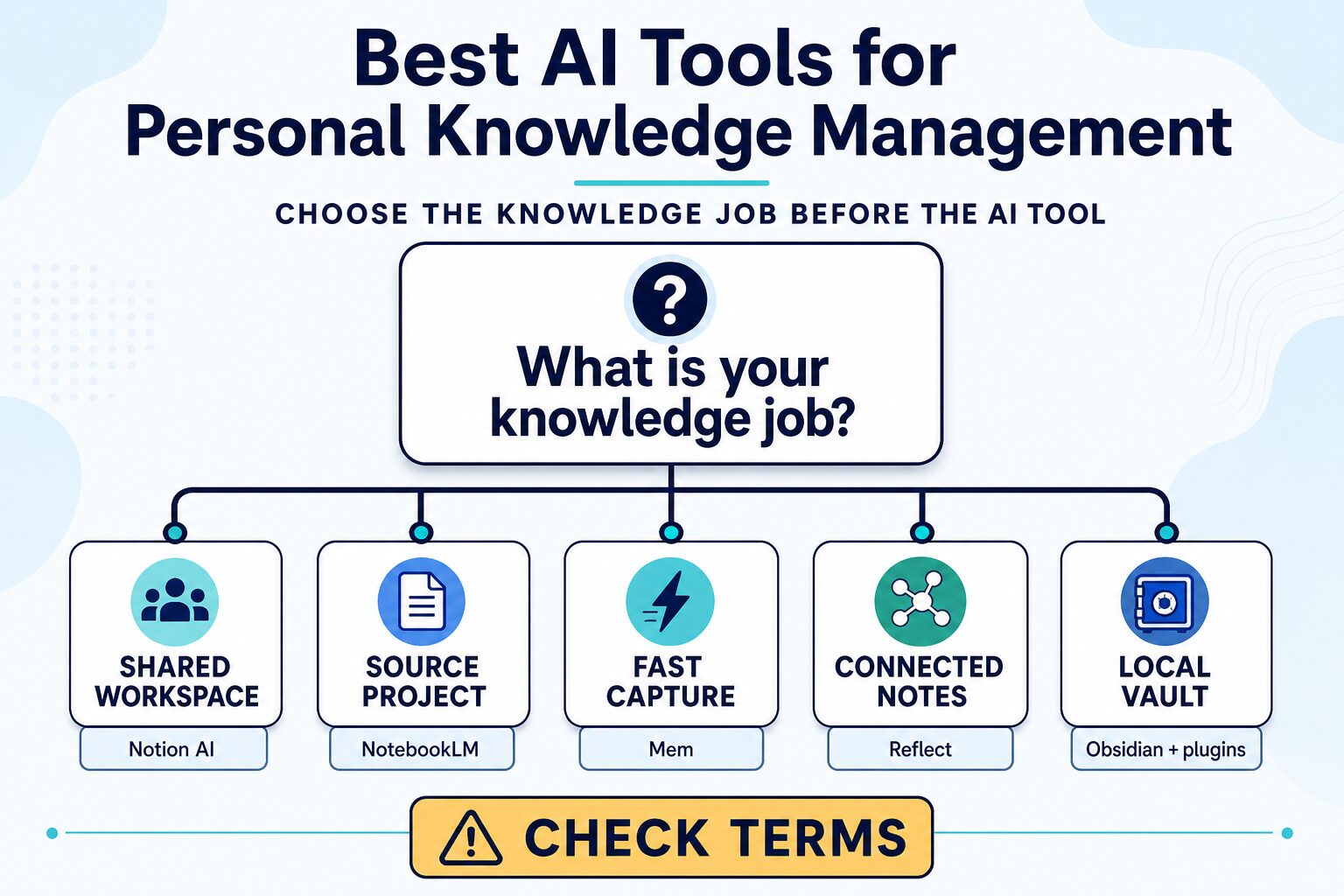
The best AI tool for personal knowledge management is the one that improves a specific knowledge job: capturing ideas, working from a bounded source set, retrieving a past decision, or keeping notes under a data boundary you understand. Start with one job, not a promise to build a perfect second brain.
Quick verdict
Choose Notion AI first if your notes already live in a shared Notion workspace and you need AI inside that existing structure. Choose NotebookLM first if a project begins with a defined set of PDFs, web pages, Docs, or other sources and you need source-grounded questions with citations.
Try Mem first if the immediate problem is capturing and retrieving small pieces of work without designing a system first. Consider Reflect if connected notes and end-to-end encryption are central to your note-taking setup. Start with Obsidian if local Markdown files and control over the vault matter more than a ready-made AI layer; evaluate each AI plugin separately.
Skip every paid plan for a week if you cannot name the five real, non-sensitive notes or sources you need to retrieve. Do the seven-day rehearsal below first.
Evidence limit: This is official research only, checked July 15, 2026. It is not a hands-on test of retrieval quality, AI accuracy, speed, support, security suitability, or commercial results.
Choose by the knowledge job, not by the longest feature list
Personal knowledge management is often described as one category, but it contains different jobs. A project notebook full of sources needs different safeguards from a quick capture system. A solo local vault has different tradeoffs from a shared workspace. If you compare only AI features, you can end up paying for a tool that does not match how your knowledge enters, stays organized, or gets retrieved.
Use these five questions before looking at a plan:
- Where does the knowledge begin? A shared workspace, a research source pack, quick notes, linked personal notes, or local files?
- What must you retrieve? A decision, a cited source, a task context, or a relationship between ideas?
- Who needs access? Only you, a client, a small team, or an organization with managed accounts?
- What data must stay out? Identify client, employer, student, health, legal, financial, or confidential material before enabling AI or a connection.
- What is the smallest proof of value? One reliably retrieved decision or source is more useful than importing an entire archive.
| Tool lane | Best first fit | Free or paid boundary to check | Skip it first if |
|---|---|---|---|
| Notion AI | Your knowledge already lives in a Notion workspace and the job is workspace search, organization, or drafting. | Notion says everyone can try AI features; an eligible upgrade is needed after complimentary responses are used. Verify the current plan and workspace permissions. | Your work is mainly a bounded source project, or you do not have a Notion structure worth extending. |
| NotebookLM | A defined source pack: project documents, research materials, web pages, or notes that need source-grounded questions. | Standard and higher access vary by account, region, and eligible Google AI, Workspace, or Education plans. Limits can change. | You need an always-on personal capture system rather than a notebook built around known sources. |
| Mem | Fast capture and later retrieval without setting up a database first. | The official page lists a small free allowance and a paid Pro plan; check live limits, billing, and export options. | You need explicit source citations, a local vault, or a reviewed data model before saving notes. |
| Reflect | Connected notes, backlinks, and a privacy-conscious personal note system. | The official site lists one annual-billing plan. Confirm renewal, AI data flow, and the current terms before paying. | You need a shared company wiki or cannot review how AI features handle your material. |
| Obsidian with AI plugins | A local-first Markdown vault where you choose the AI workflow only after reviewing each plugin. | The core app is free; Sync and each third-party plugin have separate pricing and terms. | You want a ready-to-use AI workflow without plugin selection, maintenance, or separate privacy checks. |
Use the seven-day knowledge-job rehearsal
Do not begin by importing years of notes. Use a small, ordinary work sample that contains no confidential or rights-restricted material. The goal is to find the real bottleneck before the cost of migration, an annual plan, or a connected AI feature makes the choice feel irreversible.
- Days 1–2: capture. Add five real but non-sensitive notes: a project decision, a meeting takeaway, a useful source, a question to revisit, and a reusable process note.
- Days 3–4: retrieve. Ask for one past decision, one source-backed answer, and one action context. If the tool cannot make those easy to find, do not solve the problem by adding more notes.
- Day 5: check boundaries. Review the account type, sharing settings, connected sources, AI terms, export path, and whether a plugin or model receives your content.
- Day 6: name the failure. Was the problem capture friction, missing structure, weak source provenance, poor retrieval, or a data-policy mismatch?
- Day 7: decide. Keep the smallest system that solved the job. Upgrade only if a documented limit blocked a repeatable workflow, not because a feature page looked more complete.
Notion AI: best when the workspace is already the knowledge system
Notion AI is the most logical first evaluation when your useful knowledge already lives in a Notion workspace: project pages, databases, meeting material, or a team structure that you intend to keep. Notion describes AI as working within the workspace for search, chat, and writing, so the value question is whether that existing structure is usable—not whether AI can generate a note from scratch.
Best for: someone who already relies on Notion pages or databases and wants to search, organize, or draft within the same environment.
Skip it first if: you are starting from a source pack for one research project, or you do not yet have a workspace structure worth maintaining. A broad workspace will not automatically create a retrieval habit.
Notion says everyone can try AI features for free, but its help documentation says an eligible upgrade is required after complimentary AI responses are used. It also says workspace data is not used to train its models by default, while information used to provide Notion AI is shared with AI subprocessors for that purpose. Treat both as a reason to review the current plan, permissions, connected content, and organization policy before adding sensitive material.
NotebookLM: best for a defined source project
NotebookLM is a different kind of knowledge tool. Google describes it as an AI-powered research assistant that can work from added PDFs, websites, YouTube videos, audio, Google Docs, and Google Slides. Its core promise is source-grounded interaction: you ask questions about the material in a notebook and receive inline citations to that material.
Best for: a bounded project where source provenance matters—for example, preparing a brief, synthesizing research you have permission to use, or learning from a known collection of documents.
Skip it first if: your primary need is frictionless capture across daily work. A project notebook is not the same as a long-lived personal archive.
Do not treat citations as a guarantee that an answer is complete or correct; open the cited source and check the claim. Google also distinguishes standard access from higher access and enterprise-grade handling for some account types. The account, license, region, and current limits matter, so confirm them before moving workplace or client sources into a notebook.
Mem: best for low-friction capture before formal structure
Mem is worth evaluating when the failure is simple: useful ideas, decisions, and source fragments are not being captured because organizing them feels like a second job. Its public pricing page presents notes, chat, search, connected email, collections, and templates as part of its personal-knowledge workflow.
Best for: a solo worker who wants to test whether quick capture and later search reduce the number of ideas that disappear into browser tabs or scattered notes.
Skip it first if: you need a clear source audit, a local-only vault, or data controls that have been approved for confidential work. Faster capture is not a substitute for a data-handling review.
The public page checked July 15, 2026 lists a free allowance of 25 notes, chats, and PDF pages per month and lists Mem Pro at $12/month. Those are planning facts, not a price guarantee. Confirm the live plan, billing, limits, data policy, and export workflow before relying on it.
Reflect: best for connected notes with an explicit encryption claim
Reflect fits a reader who wants a personal note system built around linked notes, quick capture, search, and a graph of ideas. Its official site also describes calendar, browser, Kindle, and Readwise connections, which can make it attractive when knowledge enters from several personal sources.
Best for: an individual who values connected notes and wants to evaluate a product that states its note contents are end-to-end encrypted.
Skip it first if: your use case is a shared company knowledge base, or you cannot approve the data flow for the AI features. The same official page says Reflect AI uses GPT-4 and Whisper, so the encryption statement should not be treated as a blanket answer for every feature or upload.
Reflect lists one plan at $10/month billed annually on the page checked July 15, 2026. Verify billing, renewal, account controls, and current AI terms before a subscription or a sensitive-note workflow.
Obsidian with AI plugins: best for a local-first vault you control
Obsidian is the right starting point when the highest priority is owning a local Markdown vault rather than adopting a ready-made AI knowledge layer. Obsidian says its core app is free without limits, does not require an account, and stores vault data locally. Its optional Sync service is a separate choice with end-to-end encryption.
Best for: a reader willing to manage a local note system and add an AI workflow only after reviewing the exact plugin, model provider, cost, permissions, and data handling.
Skip it first if: you need a simple, supported AI experience immediately. An AI plugin stack is not one product: plugin developers can have separate policies, support, update cycles, and model connections.
Obsidian’s public price page lists optional Sync at $4 per user per month billed annually or $5 monthly. The core-app and Sync claims do not automatically extend to a third-party plugin. Read each plugin’s documentation and test it only with non-sensitive material until its terms are clear.
Privacy, sharing, and source checks before you add AI
A safer knowledge-management rule
Privacy statements are also not interchangeable. For example, a local vault, an encrypted sync service, an AI assistant, a connected email account, and a third-party plugin can each have a different data path. Make the smallest connection that proves value and remove access you no longer need.
Where to go next
If your real problem is writing rather than retrieval, see our guide to AI writing tools for non-native English professionals. If the job is research discovery and source synthesis, use our comparison of AI literature-review tools. For a broader first-step framework, read how to choose AI tools for work.
Final recommendation
Pick one knowledge lane, not a universal winner. Start with Notion AI only when the workspace already holds your useful work. Choose NotebookLM when a bounded source pack needs grounded questions and source checks. Test Mem for capture friction, Reflect for connected personal notes with terms you can accept, and Obsidian when local control matters enough to manage each plugin separately. Run the seven-day rehearsal before moving an archive or buying a second plan.
Frequently asked questions
What is the best free AI tool for personal knowledge management?
There is no universal free winner. Obsidian’s core app is free, Notion offers complimentary AI responses, NotebookLM provides standard access for eligible accounts, and Mem lists a limited free allowance. Choose the one that fits the knowledge job, then confirm the current limit and terms.
Is NotebookLM a personal knowledge management tool?
It can support a personal knowledge workflow when your work begins with a defined source set. It is less suited to being your only daily capture system because its strength is source-grounded project work, not replacing every note type.
Are AI notes safe for confidential work?
Do not assume so. Safety depends on the product, account, plan, connections, AI feature, organization policy, and the material itself. Check the current official terms and permissions before uploading confidential content.
Do Obsidian AI plugins have the same privacy as Obsidian?
Do not assume that they do. Obsidian’s local-first and Sync statements apply to Obsidian’s own product and services. A third-party plugin can send content to another provider under separate terms.