ChatGPT Plus vs Claude Pro vs Gemini Advanced: Which Should You Pay For?
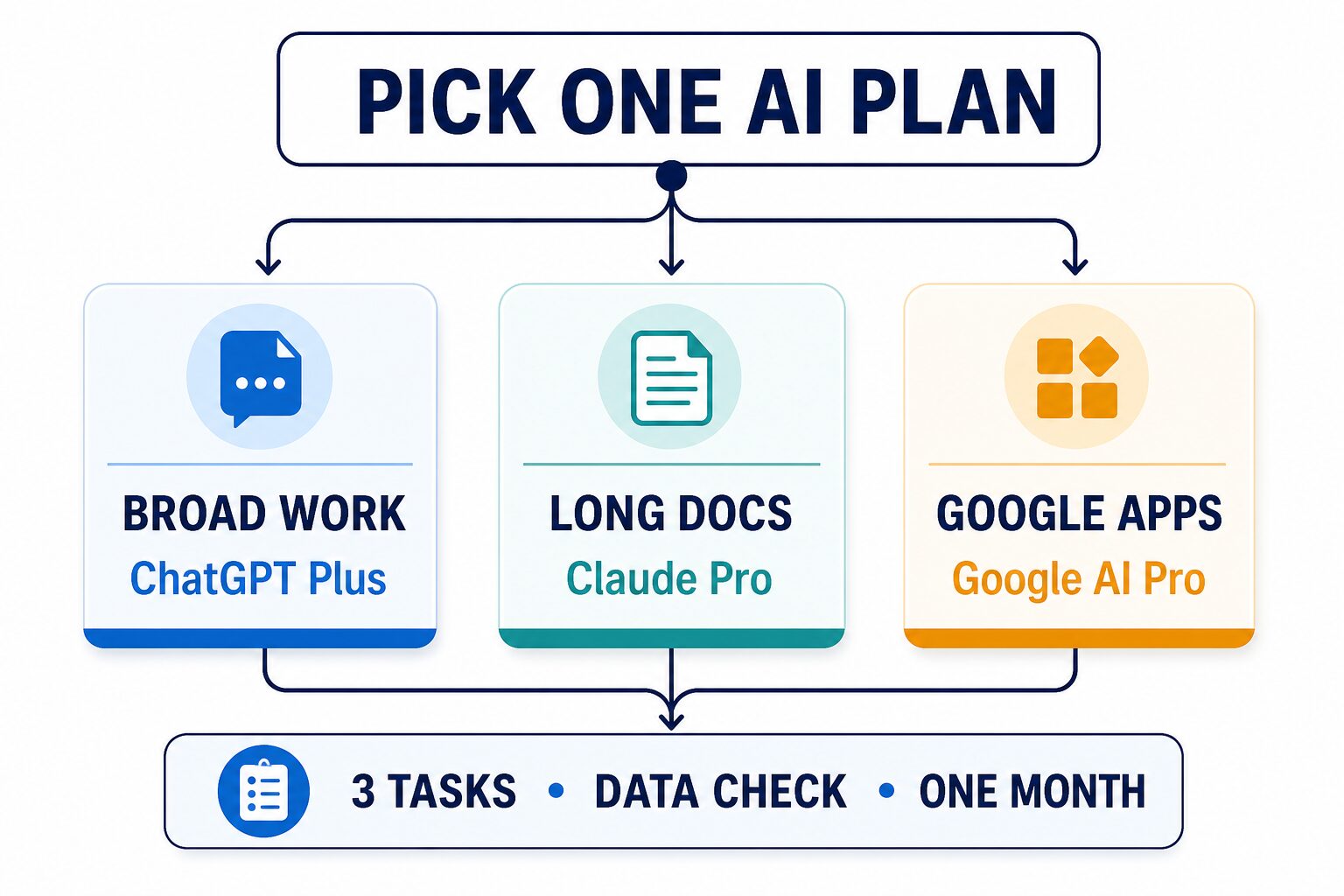
If you can pay for only one AI subscription, start with the work you repeat—not the model that won this week’s comparison. Choose ChatGPT Plus for broad mixed work, Claude Pro for long-document reading and careful writing, or Google AI Pro—the current plan name behind much of the older “Gemini Advanced” search intent—when your work is centered on Google apps. Stay free until one plan proves useful on three real tasks.
Evidence note: Updated July 12, 2026 from official OpenAI, Anthropic, Google, and privacy/help pages. This is an official-research-only comparison, not a hands-on model benchmark. Prices, limits, models, benefits, regions, and plan names can change; check the linked official pages before paying.
Disclosure: The product links in this article go to official pages. We do not receive a commission from the three plans compared here.
Quick Answer: Which Paid AI Plan Should You Choose?
Pick ChatGPT Plus if you want one flexible assistant across writing, files, analysis, coding help, images, and everyday planning. Pick Claude Pro if your repeated pain is reading, restructuring, or writing long documents. Pick Google AI Pro if the paid value comes from Gemini plus Google-centered tools and account benefits. Pick none if the free versions already complete your weekly tasks or your workplace has not approved consumer AI for the data involved.
This article focuses on the subscription decision, not a permanent model winner. For a broader product comparison, see ChatGPT vs Claude vs Gemini for work. If cost is the main constraint, start with the best free AI tools for work.
| Try first | Best fit | US price checked | Do not pay yet if… |
|---|---|---|---|
| ChatGPT Plus | Your week mixes drafting, analysis, files, coding help, images, voice, and planning. | $20/month on the checked OpenAI official pages. API usage is separate. | You use only one occasional task, or work files require organizational controls. |
| Claude Pro | You spend the most time on long drafts, reports, policies, research notes, transcripts, or careful rewriting. | $20/month on Anthropic’s checked US plan guide. | You mainly need Google app integration or reliably higher capacity than Pro provides. |
| Google AI Pro often searched as Gemini Advanced | Your workflow already lives in Google apps, NotebookLM, Search, Chrome, or Google account storage. | $19.99/month on the checked US Gemini subscriptions page. | You do not use the included Google ecosystem benefits, or a managed Workspace account has different rules. |
Do the Three-Task Test Before You Subscribe
A feature table cannot tell you whether a subscription will earn a place in your week. Use the same three non-confidential tasks on each free plan first. You are not trying to crown a universal winner; you are checking whether the paid tier removes a real limit in your workflow.
- Repeated task: choose something you do at least three times a week, such as rewriting a client email, outlining a report, reviewing meeting notes, or explaining a spreadsheet formula.
- Hard task: choose the task that currently creates the most friction, such as comparing two long policies, restructuring a dense draft, or turning scattered research into an action list.
- Handoff task: choose an output another person must use—a brief, email, table, checklist, code explanation, or document plan. Check how much cleanup remains before you can send it.
Score usefulness, not excitement. For each task, record whether the tool kept the meaning intact, produced a usable structure, and reduced your editing steps. Then record the friction: uploads, context rebuilding, missing integrations, limits, or policy concerns. Pay only when one plan clearly improves repeated work and its data rules are acceptable.
A privacy boundary can veto the purchase. If the task requires confidential client, company, student, HR, medical, legal, financial, or unpublished research material, use a safe substitute or synthetic sample until the relevant account type and organizational policy are confirmed. Our AI tool privacy checklist can help with that review.
ChatGPT Plus: Best for Broad, Mixed Work
ChatGPT Plus is the strongest first trial when your day changes shape. The value is breadth: a single chat product for writing, file analysis, research, coding help, images, voice, and general problem-solving. That breadth is useful for operators, analysts, creators, students, and professionals who do not yet have one narrow AI workflow.
OpenAI’s ChatGPT Plus help page lists enhanced ChatGPT web-app access at $20/month and says usage limits can vary. The official pricing page is the safer place to recheck current features and neighboring tiers. OpenAI also states that ChatGPT Plus does not include API usage; developer API costs are billed separately.
Choose it when
- Your three tasks span different formats rather than one document-heavy workflow.
- You want one place for drafts, files, analysis, planning, and creative work.
- You need a flexible starting point before specializing.
Skip it when
- The free plan already handles your real weekly usage.
- Your main bottleneck is long-document review and careful text restructuring.
- You need team administration, organizational data controls, or API access rather than a personal chat subscription.
Claude Pro: Best for Long Documents and Careful Writing
Claude Pro is the natural first trial when your work is mostly text and the cost of losing context is high. Think reports, policies, research notes, transcripts, long drafts, comparison memos, and revision work where structure and meaning matter more than a wide bundle of creative features.
Anthropic’s official plan guide lists Claude Pro at $20/month for regular individual use and separates it from Free and higher-capacity Max plans. Capacity and limits can vary, so Pro should not be treated as unlimited. If your three-task test repeatedly hits a limit, verify whether the task belongs on a higher-capacity or organizational plan before paying.
Choose it when
- Your repeated and hard tasks both involve long source material.
- You care about document structure, careful rewriting, and maintaining a line of reasoning.
- You can separate consumer-account work from confidential material.
Skip it when
- Your value comes mainly from Google apps or a broad multimodal tool bundle.
- You need predictable high-volume capacity that the current Pro limits do not support.
- You are buying it for developer API access rather than the Claude consumer product.
Google AI Pro: Best for Google-Centered Work
Google AI Pro makes the clearest case when Gemini is only one part of the purchase. The official subscription surface also highlights Google-product benefits such as higher Gemini access and NotebookLM-related capacity. The exact bundle can vary, but the buying logic is stable: pay when the Google ecosystem benefits are part of your repeated work, not merely because you want another chatbot tab.
Google’s US Gemini subscriptions page lists Google AI Pro at $19.99/month. Many searchers still say “Gemini Advanced,” but Google AI Pro is the current paid-plan language on the checked buying page. Keep it separate from Google AI Plus, Google AI Ultra, and Gemini access supplied through work or school accounts.
Choose it when
- Your repeated tasks begin or end in Google apps, NotebookLM, Search, Chrome, or Google Drive storage.
- The included Google benefits replace another subscription or reduce app switching.
- Your personal or managed account is eligible for the features you need.
Skip it when
- You do not use the Google ecosystem benefits enough to justify the bundle.
- Your organization controls Gemini access through a different Workspace plan.
- You are choosing from the name alone and have not checked current regional benefits.
Privacy and Account Type Can Change the Answer
A consumer subscription is not automatically the right account for company work. The relevant question is not only “Can this tool read my file?” It is “Which account terms, data controls, retention settings, connected apps, and administrator rules apply to this file?”
- ChatGPT: review the official Data Controls FAQ, including the model-improvement setting and Temporary Chat handling.
- Claude: review Anthropic’s consumer model-improvement explanation, including opt-in, safety-review, feedback, and Incognito-chat boundaries.
- Gemini: review the Gemini Apps Privacy Hub for prompts, files, connected apps, device/browser context, and differences for work or school accounts.
Turning off one training setting does not answer every privacy question. Retention, safety review, connected apps, feedback, memory, account ownership, and workplace rules can still matter. When the material is sensitive, confirm policy first or use a synthetic sample.
When Free Is Better—and When Two Plans Make Sense
Free is better when your tasks are occasional, limits rarely interrupt you, or you are still discovering the workflow. A paid plan should remove a repeated bottleneck, not create a reason to invent more AI work.
Two plans can make sense after one plan is already part of weekly work and a second tool solves a separate, measured problem. For example, a broad assistant plus a research-specific service can be a rational split, but only when the tasks do not overlap. If research is the second need, compare ChatGPT Plus vs Perplexity Pro before adding another subscription.
For a wider stack decision, use our guide to AI productivity tools for solo operators and small teams. The goal is fewer overlapping tools with clearer jobs.
FAQ
Is ChatGPT Plus better than Claude Pro?
Not universally. ChatGPT Plus is the broader first trial for mixed work; Claude Pro is the clearer first trial for document-heavy reading and writing. Use the same three tasks and choose the plan that reduces more real friction without crossing your data boundary.
Is Gemini Advanced now Google AI Pro?
Google AI Pro is the current personal paid-plan language on the checked Gemini subscriptions page and is the safer name to use for many searches that still say Gemini Advanced. Recheck the official page because Google also offers neighboring tiers and separate Workspace routes.
Do ChatGPT Plus or Claude Pro include API usage?
ChatGPT Plus does not include OpenAI API usage. Consumer chat subscriptions and developer API billing are separate products. Verify current Claude consumer and developer terms separately before assuming a Pro subscription covers API work.
Which plan is best for work documents?
Claude Pro is the natural first trial for long, text-heavy documents; ChatGPT Plus is useful when the document is one part of a broader workflow; Google AI Pro is attractive when the document lives inside a Google-centered process. Account policy and data sensitivity can override all three choices.
Should I subscribe to all three?
Usually not at the start. Pick one, run the three-task test for a month, and cancel if it does not become part of weekly work. Add a second plan only for a distinct task the first plan cannot handle efficiently.
Final Recommendation
Start with ChatGPT Plus for breadth, Claude Pro for long-document work, or Google AI Pro for Google-centered work. Then test three real tasks, check the account’s data rules, and keep only the plan that earns repeated use. If no option clearly improves your week, the correct paid plan is none.
Next step: write down your repeated task, hard task, handoff task, and data boundary before opening any pricing page. Compare the current official terms, try one plan—not three—and review the decision after one billing cycle.