AI Tool Privacy Checklist: 7 Checks Before You Paste
An AI tool privacy checklist should answer one practical question before you paste anything: does this tool need the real work data to complete the task? If a client note, PDF, transcript, spreadsheet, resume, source file, or connected app contains information that would matter if exposed, pause before upload.
Quick verdict: paste only after you verify seven things: the data, account, training use, retention, access, policy, and minimum context. If any answer is unclear, redact the input or stop. A paid individual plan, temporary chat, or familiar brand name does not replace your employer’s rules, a client agreement, participant consent, or the exact product terms.
This guide is for professionals, remote workers, graduate students, and small business owners using chatbots, writing assistants, meeting tools, PDF summarizers, and connected work apps. It is an official-source synthesis checked on July 13, 2026, not legal advice or a hands-on security audit.
AI Tool Privacy Checklist: 7 Checks Before You Paste
- Data: identify what the input contains and who could be affected.
- Account: confirm the exact product, plan, workspace, tenant, and admin settings.
- Training: check whether prompts, files, outputs, or feedback may improve models or be human-reviewed.
- Retention: check how long chats, uploads, logs, recordings, and deleted items may remain.
- Access: check connectors, third-party apps, subprocessors, sharing, and existing file permissions.
- Policy: confirm workplace rules, contracts, consent, jurisdiction, and any regulated-data limits.
- Minimize: remove names and secrets, replace details, and share only the smallest useful excerpt.
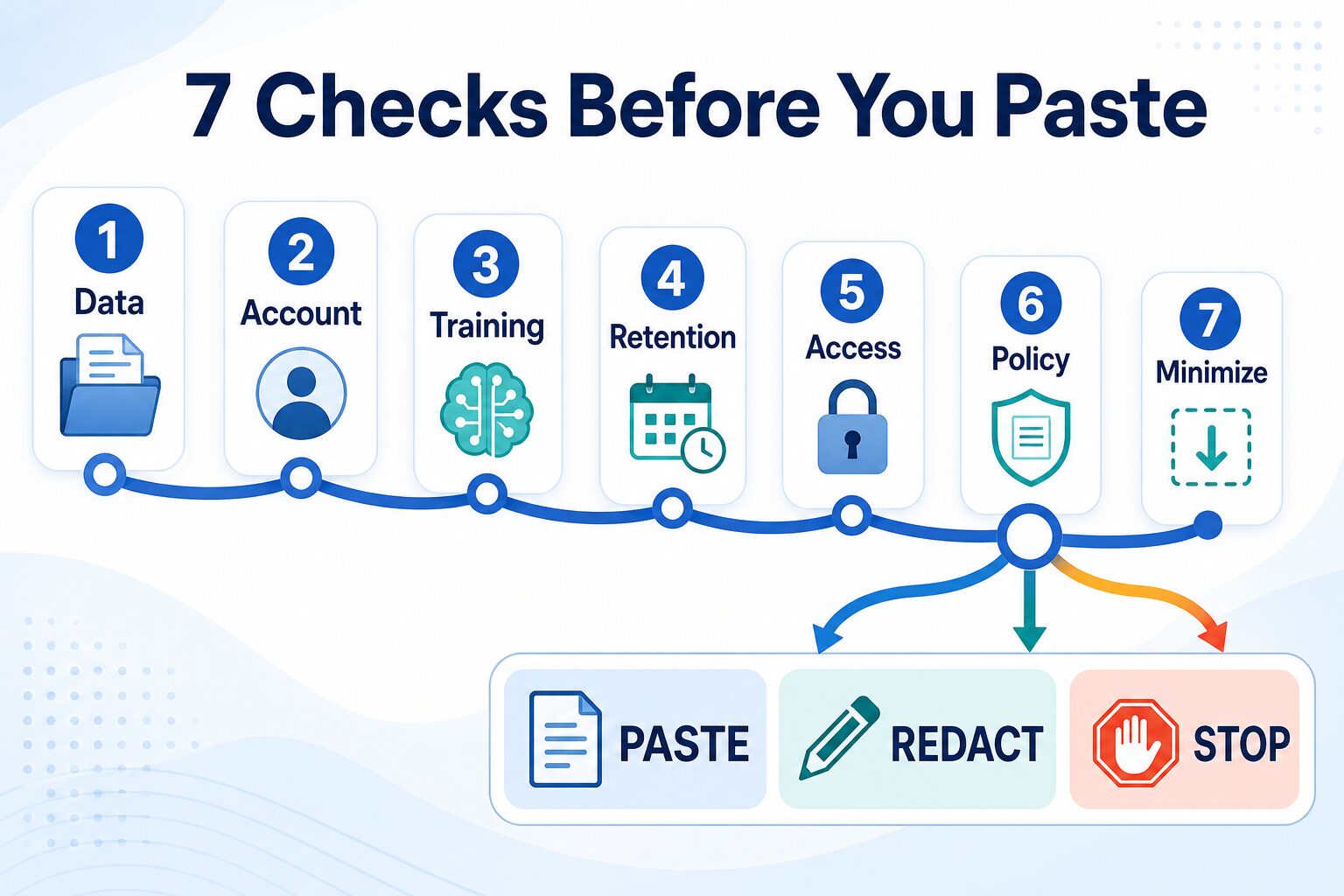
If you would not send the same information to an outside vendor without permission, do not send it to an AI service until the seven checks are complete.
Start With the Consequence, Not the File Type
A PDF is not automatically sensitive, and a short chat prompt is not automatically safe. A public annual report may be low risk. One sentence containing an API key, customer diagnosis, unreleased result, or confidential deal term may be high risk.
| Input | Default decision | What to do first |
|---|---|---|
| Public source, generic prompt, synthetic example, or non-sensitive formatting request | Usually paste | Remove unnecessary names, IDs, and background details anyway. |
| Internal draft, client context, resume, student work, unpublished research, meeting notes, or customer question | Redact or ask first | Use placeholders, get approval, or move to an organization-managed workflow. |
| Credentials, regulated records, confidential contracts, customer exports, private source code, or security incident data | Stop | Use an explicitly approved secure system or do not use AI for this task. |
The decision should be based on impact if the data leaves its expected boundary. Ask whether a person could be identified, a client would be surprised, a contract could be breached, a credential could be abused, or an organization could be harmed.
1. Identify the Data and the People Behind It
Before you inspect vendor settings, classify the content. Look beyond obvious names and email addresses. A combination of role, company, date, location, project detail, or unusual event can identify someone even after a name is removed.
Use extra caution with:
- client, customer, employee, applicant, student, patient, or participant information;
- contracts, pricing, roadmaps, unpublished results, legal strategy, and internal financials;
- meeting audio, transcripts, screen shares, chat logs, and private calendars;
- credentials, recovery codes, private keys, security logs, and vulnerability details; and
- connected mailboxes, drives, workspaces, browsers, repositories, and customer systems.
Data ownership matters too. You may be comfortable sharing your own draft, but you may not have permission to share a coworker’s comments, a client’s attachment, a student’s paper, or a meeting participant’s voice.
2. Verify the Exact Product and Account
Do not stop at the vendor name. Consumer chat, paid individual, business, enterprise, education, API, and organization-managed products can have different contracts and controls.
OpenAI’s business data privacy page says listed business products and the API do not use organization data to train models by default. Its separate ChatGPT Data Controls FAQ explains consumer controls such as turning off model improvement and using Temporary Chat. Those are different contexts, so check the actual account in front of you.
Anthropic’s commercial privacy guidance likewise separates Claude for Work and API treatment from consumer Claude plans. Google publishes separate guidance for Gemini Apps and generative AI in Google Workspace. The practical lesson is consistent: the logo does not tell you which agreement protects the data.
Record the product name, plan, account owner, workspace or tenant, admin status, contract, and relevant privacy page before approving a repeat workflow.
3. Check Training and Human Review
Ask whether prompts, files, outputs, feedback, or coding sessions can be used to improve models. Then ask whether people may review content for product improvement, safety, abuse monitoring, support, or feedback handling.
Settings can change the answer. OpenAI’s Data Controls FAQ says turning off “Improve the model for everyone” stops signed-in ChatGPT conversations from being used to improve models, while Temporary Chats have separate retention and abuse-monitoring terms. Google’s Gemini Apps Privacy Hub warns users not to enter confidential information they would not want a reviewer to see and explains how Keep Activity and temporary-chat choices affect handling.
Do not translate “not used for training” into “never stored,” “never reviewed,” “no subprocessors,” or “approved for sensitive data.” Those are different questions.
4. Check Retention, Deletion, and Feedback
Find the current answer for chats, uploaded files, recordings, transcripts, logs, backups, feedback, and deleted items. Check whether the same rule applies to every feature and integration.
- How long is normal history retained?
- How long are temporary or deleted chats retained?
- Can abuse-monitoring or feedback records follow a different schedule?
- Can an admin export, delete, or place legal holds on data?
- Does deleting the source remove copies already shared with a connected service?
Retention values are change-prone. Check the live official page instead of relying on an old screenshot, social post, or article summary.
5. Audit Connected Apps and Permissions
A single prompt exposes what you paste. A connector can expose the files, messages, events, pages, or repositories that the signed-in user can access. This makes permissions part of the AI privacy review.
Google’s Gemini Apps Privacy Hub says connected apps can exchange chat information and content such as emails, files, events, photos, and videos, and that third-party services apply their own policies. Microsoft’s Microsoft 365 Copilot privacy documentation says Copilot can use content available through Microsoft Graph and only surfaces organization data the user can already view. That makes over-broad source permissions an AI problem even when the AI product follows its stated rules.
Before connecting Gmail, Outlook, Drive, Microsoft 365, Slack, Notion, Zoom, a browser, or a repository, ask:
- Which sources and actions are in scope?
- Can the connection be limited to selected folders, sites, or accounts?
- Who can approve, audit, revoke, and offboard access?
- What data flows to third-party apps or agents?
- Does disconnecting the app also delete data already copied elsewhere?
For a broader plan comparison, see ChatGPT Plus vs Claude Pro vs Gemini Advanced. Use privacy and connector scope as veto criteria, not as a footnote after feature comparison.
6. Confirm Policy, Contract, Consent, and Jurisdiction
Vendor controls are only one layer. Workplace policy, client agreements, nondisclosure terms, consent rules, education requirements, professional duties, and local law may be stricter.
Meeting assistants are a clear example. A transcript can contain voices and information from coworkers, clients, applicants, students, vendors, or patients. Before recording or summarizing, confirm participant notice or consent, organization approval, sharing rules, retention, and the exact meeting account.
Use our AI meeting assistants guide to compare workflow fit, but treat approval and consent as separate gates. The same principle applies to PDFs: a public paper is not the same as a confidential contract or unpublished manuscript. See the AI PDF summarizer comparison and NotebookLM vs ChatPDF only after deciding whether the document may leave its current boundary.
7. Run the Minimum-Context Test
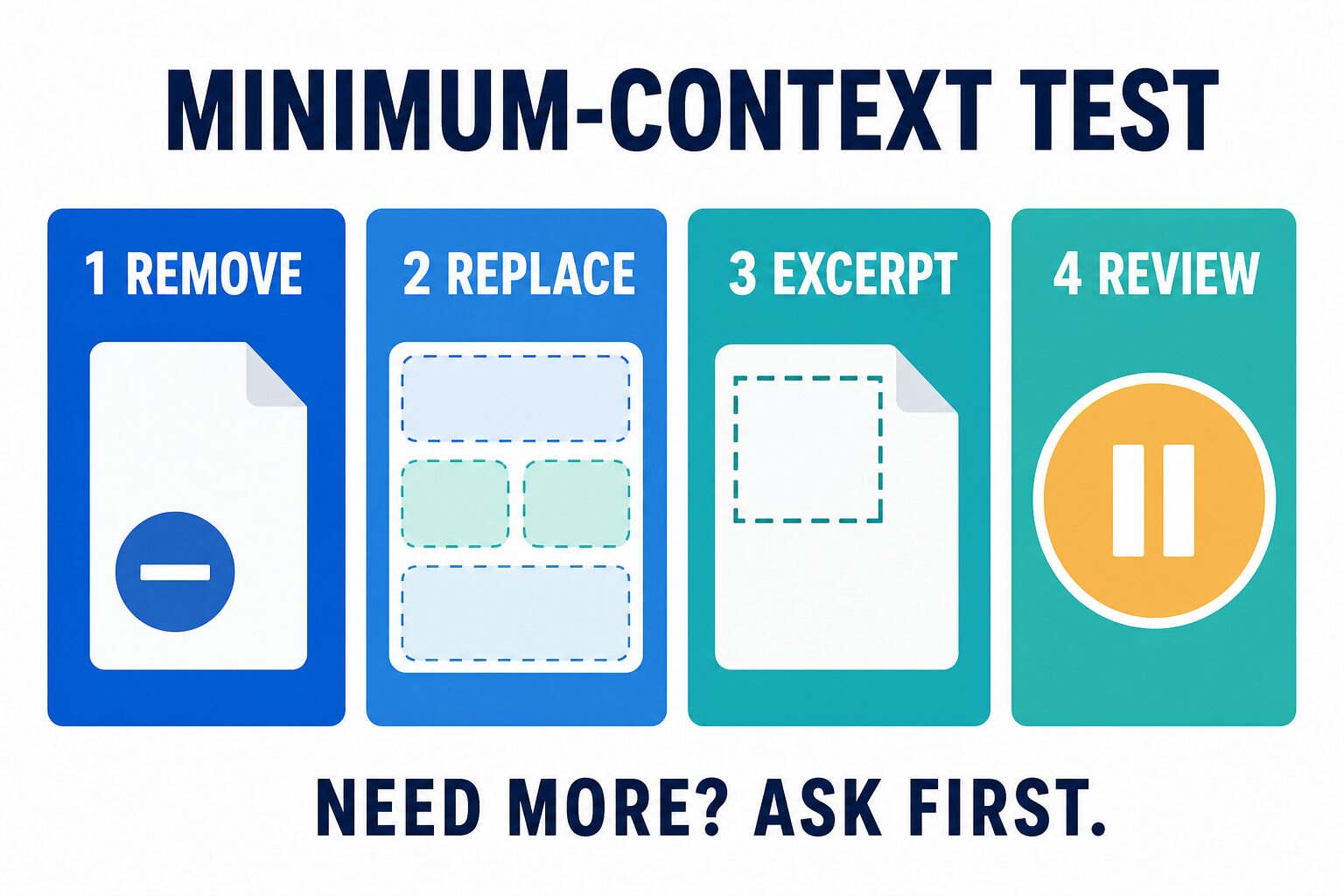
The safest useful prompt is usually not the fullest prompt. Try to solve the task with the least real data possible:
- Remove identifiers. Delete names, emails, account numbers, addresses, signatures, metadata, and unique details.
- Replace facts. Use placeholders such as Client A, Project B, or [deadline] when the exact fact is not needed.
- Share one excerpt. Paste the smallest section that contains the writing, analysis, or formatting problem.
- Review the output. Check that the response does not reconstruct private facts or invite you to share more than necessary.
| Instead of sharing | Try this minimum-context version |
|---|---|
| A client email with names, deal terms, and project history | “Draft a calm reply to a client whose deliverable is late. Accept responsibility, give a new date, and avoid legal conclusions.” |
| A full meeting transcript with employee names and roadmap details | Paste only anonymized action items and ask for concise tasks labeled Owner A, Owner B, and Owner C. |
| A resume with address, phone number, references, and employer details | Share anonymized bullet points and ask for clearer achievement wording for a named role. |
| A confidential contract or customer export | Do not paste it into a general AI tool. Ask a high-level question with synthetic terms or use an approved secure workflow. |
Redaction is not a guarantee. If the remaining context can still identify a person, organization, client, incident, or deal, move the input back to “ask first.”
What You Should Not Paste Into a General AI Tool
Stop by default: credentials, recovery codes, private keys, regulated records, confidential contracts, private customer databases, unreleased financials, legal strategy, private source code, security logs, vulnerability details, or meeting content without the required approval and consent.
The NIST AI Risk Management Framework provides a broader risk-management reference. For day-to-day work, the useful translation is: rely on written controls and explicit approval, not a vague feeling that a tool is private.
FAQ
Is a paid AI plan automatically private enough for work?
No. Payment may change limits or features, but privacy depends on the exact product, contract, data controls, admin settings, connectors, and organization policy. A paid individual account is not automatically equivalent to a managed business or enterprise account.
Can I paste a client email into ChatGPT, Claude, Gemini, or Copilot?
Use the seven checks first. A generic, anonymized writing problem is lower risk. A real client email containing names, contract terms, account history, legal issues, or confidential context should be minimized, approved, or handled in an organization-managed workflow.
Are temporary chats enough for sensitive work?
No. Temporary modes can change history, training, or retention behavior for a specific product, but they do not override policy, consent, contracts, regulated-data duties, or the risk of sharing the content with an outside service.
What if I cannot find a clear privacy answer?
Treat uncertainty as a reason to redact or stop. Use public or synthetic data, ask the tool owner or security team, and record the official source before making the workflow routine.
Final Recommendation
Make “minimum necessary” your default. Use public sources, generic prompts, placeholders, synthetic examples, and short anonymized excerpts whenever they can solve the task. Slow down for work files, client context, resumes, transcripts, PDFs, connected apps, and personal data. Stop for secrets, regulated records, confidential obligations, or any input that lacks clear permission.
The best AI privacy checklist is not a one-time vendor score. It is a repeatable decision: check the data, account, training, retention, access, policy, and minimum context before every new workflow.