Notion AI vs ClickUp AI: Which Workspace Is Better for Solo Work?
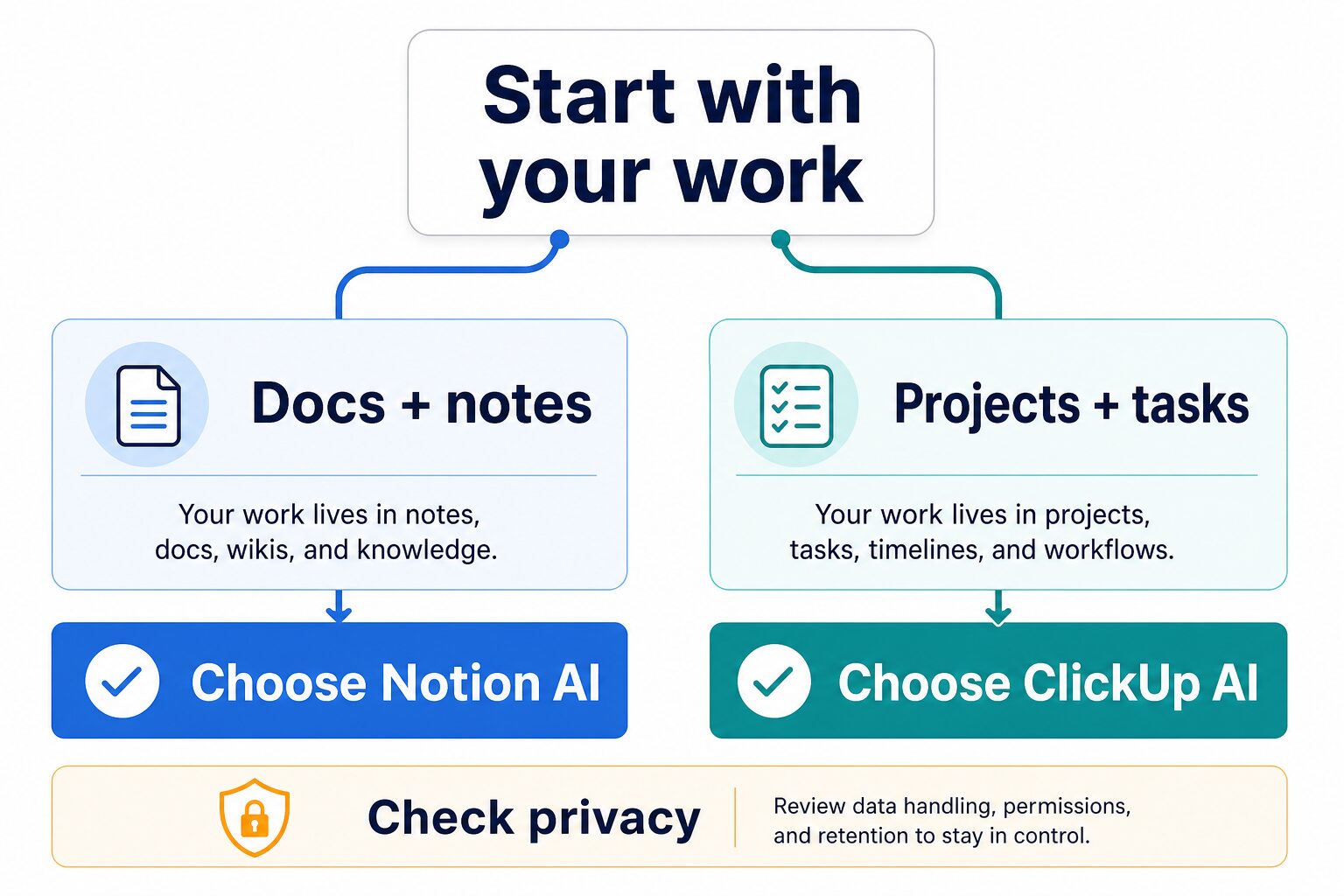
Choose Notion AI if your solo work is built around notes, docs, wikis, light databases, and flexible knowledge capture. Choose ClickUp AI if your work is built around tasks, deadlines, project views, dashboards, assignments, and team-style accountability. The better workspace is not the one with the louder AI promise. It is the one closest to where your work already lives.
Quick verdict: Notion AI for knowledge work, ClickUp AI for project work
- Start with Notion AI if you write notes, draft docs, organize research, maintain a personal wiki, or run lightweight projects from databases and pages.
- Start with ClickUp AI if you manage task-heavy work, client projects, timelines, dashboards, dependencies, assignments, and recurring operations.
- Pause before paying for either if you have not cleaned up permissions, do not know where your real system of record is, or only need a simpler weekly review workflow.
Evidence status: this comparison is official-research-only. Pricing, feature, privacy, and security notes come from official Notion and ClickUp pages checked on June 17, 2026. This is not a hands-on benchmark of AI answer quality, setup time, or productivity gains.
Notion AI vs ClickUp AI comparison table
| Decision point | Notion AI | ClickUp AI / ClickUp Brain | What to verify before paying |
|---|---|---|---|
| Best first fit | Flexible notes, docs, wikis, personal operating systems, lightweight databases, and knowledge-centered solo work. | Structured tasks, projects, timelines, dashboards, docs tied to execution, automations, and team-style operations. | Where your real work lives now: notes and docs, or projects and tasks. |
| Pricing snapshot checked June 17, 2026 | Notion pricing showed Free at $0/member/month, Plus at $10/member/month, Business at $20/member/month, and Enterprise custom pricing. Free and Plus list trial AI capabilities; Business includes core AI workspace features. | ClickUp pricing showed a Free plan, Unlimited at $7/user/month billed yearly, Business at $12/user/month billed yearly, Brain AI at $9/user/month, and Everything AI at $28/user/month. | Billing mode, taxes, region, trial limits, AI usage/credits, and whether your base plan includes the feature you need. |
| Work style | Better when the work is written, messy, exploratory, or organized as pages and databases. | Better when the work is operational, deadline-driven, assigned, tracked, and reviewed in project views. | Whether you need a blank flexible workspace or a stronger project-management structure. |
| AI value to expect | Official pages position Notion AI around workspace context, writing, docs, research, meeting notes, databases, enterprise search, and agents. | Official pages position ClickUp Brain around tasks, docs, chat, calendar, email, connected apps, AI writing, enterprise search, agents, automations, and workspace context. | Do not assume output quality from a feature list. Test with low-risk work before relying on either tool. |
| Privacy and admin caution | Notion publishes Notion AI security and privacy practices, AI subprocessor notes, permissions, compliance scope, and admin settings. | ClickUp publishes security and AI privacy statements, including encryption notes, AI partner training restrictions, zero third-party data retention language, and permission-respecting AI access. | Workspace permissions, retention, connected apps, sensitive data policy, and whether your employer allows this use. |
Choose Notion AI if your work starts as notes and documents
Notion AI is the cleaner first choice when your work starts as written context. That includes meeting notes, research notes, draft documents, content calendars, personal wikis, lightweight CRM pages, project briefs, and databases that you adjust as your work changes.
Notion’s official AI page describes AI capabilities across pages, docs, tasks, databases, connected apps, Enterprise Search, AI Meeting Notes, Custom Agents, and admin controls. Its pricing page, checked on June 17, 2026, showed trial AI capabilities on Free and Plus, and a Business plan that includes Notion Agent, AI Meeting Notes, and Enterprise Search Beta.
Skip or pause if: you mainly need task dependencies, workload views, detailed dashboards, native time tracking, project reporting, or a ready-made operations system. Notion can model many of those workflows, but the setup can become a project by itself.
Choose ClickUp AI if your work starts as tasks and projects
ClickUp AI, now marketed around ClickUp Brain, is the cleaner first choice when work already has owners, deadlines, statuses, dependencies, recurring tasks, dashboards, and client or team accountability. For solo operators, that can still matter if your work looks like operations: launches, client delivery, editorial calendars, recurring admin, or cross-functional projects.
ClickUp’s official product and pricing pages position Brain across tasks, docs, chat, calendar, email, connected apps, premium AI models, enterprise search, agents, automations, and AI writing. The pricing page, checked on June 17, 2026, showed a Free plan for the base workspace, paid workspace tiers such as Unlimited and Business, and separate AI pricing for Brain AI and Everything AI.
Skip or pause if: you only need a lightweight personal workspace, dislike configuration, or do not want a project-management system around your solo work. ClickUp can be powerful, but extra structure is only helpful when your work needs it.
How to decide without overbuilding your workspace
Pick Notion AI when the source of truth is pages, notes, wikis, briefs, and flexible databases.
Pick ClickUp AI when the source of truth is tasks, statuses, deadlines, dashboards, and project views.
Start smaller. A flexible Notion setup may be enough unless your solo work has many recurring projects.
Favor ClickUp when accountability, assignment, reporting, and workflow visibility matter more than free-form notes.
If you are still unsure, write down the last five times your workspace failed you. If the failures were “I could not find the right note” or “my research was scattered,” test Notion first. If the failures were “I missed a deadline,” “the status was unclear,” or “I could not see what was blocked,” test ClickUp first.
Run This Five-Note Workflow Test Before Upgrading
Create the same small project in both tools and use five realistic notes: a brief, meeting notes, a decision log, a task handoff, and a weekly summary.
- Capture the brief without redesigning the workspace.
- Turn meeting notes into the next actions.
- Find the reason behind one decision.
- Assign or schedule the handoff without copying it elsewhere.
- Generate the weekly summary and trace every claim back to its note or task.
Choose Notion AI when the notes remain the source of truth and flexible documents are the center of the system. Choose ClickUp AI when the notes are valuable mainly because they become assigned, scheduled, and tracked work. If both tests require duplicate entry, fix the workspace design before paying for more AI.
Pricing and free-plan cautions
Do not compare only the lowest visible monthly price. You need to compare the base workspace cost, AI add-on or plan requirement, annual versus monthly billing, usage or credit limits, guest/member rules, and whether the AI feature you want is included in your selected plan.
For Notion, the official pricing page showed Free, Plus, Business, and Enterprise tiers, with AI availability varying by plan and trial status. For ClickUp, the official pricing page showed both base workspace plans and separate AI pricing. That means the cheapest path depends on what you actually need: a flexible knowledge workspace, a project-management system, or deeper AI features.
Before upgrading, open the official pricing pages in your account region and check the checkout screen. Public pricing pages are useful for planning, but checkout terms, taxes, discounts, billing mode, and feature availability can change.
Privacy and workspace-data checks
Workspace AI is different from a blank chatbot because it can work near your pages, tasks, docs, comments, connected apps, and user permissions. That is useful, but it also raises a practical question: is your workspace clean enough for AI assistance?
- Review permissions first: fix overshared pages, databases, spaces, folders, docs, and project views before broad AI use.
- Separate test data from sensitive data: do not use client, legal, HR, financial, health, student, unreleased product, or security-sensitive content for casual trials.
- Check retention and subprocessors: read each vendor’s current AI privacy/security page, not only the marketing page.
- Confirm employer policy: a vendor’s security page does not override workplace rules or client obligations.
- Keep human review: do not let AI make final decisions on contracts, finances, hiring, compliance, academic work, or client deliverables.
For a broader workflow, use our AI tool privacy checklist for professionals before connecting either workspace to sensitive material.
Where this fits in a solo AI productivity stack
This comparison is narrower than a general “best productivity tool” list. If you are still building your overall setup, start with our guide to AI productivity tools for solo operators and small teams. If your main need is task planning, read best AI task management tools for busy professionals. If you already have tools but need a better review habit, use how to build a weekly review system with AI.
If English writing quality is part of your workflow, compare this with the practical AI tool stack for non-native English professionals. Notion and ClickUp can help organize work, but they are not always the first tool to choose when the real bottleneck is clearer workplace English.
FAQ
Is Notion AI better than ClickUp AI?
Not universally. Notion AI is a better first fit for docs, notes, wikis, flexible databases, and knowledge work. ClickUp AI is a better first fit for tasks, projects, deadlines, dashboards, and operations. The right answer depends on your workflow, not a generic AI ranking.
Can Notion replace ClickUp for solo work?
Sometimes. A solo operator can run many lightweight projects in Notion if they like building flexible systems. But if you need structured task dependencies, dashboards, time tracking, workloads, and more formal project views, ClickUp is usually the more natural project-management fit.
Can ClickUp replace Notion for notes and docs?
ClickUp includes docs and wikis, so it can replace Notion for some teams that want one operations workspace. But if your work is primarily research, writing, notes, personal knowledge management, or flexible database building, Notion may feel lighter and easier to shape.
Should I use both Notion and ClickUp?
Use both only if each has a clearly separate job. For example, Notion can hold reference knowledge while ClickUp runs project execution. If you are a solo operator, maintaining two overlapping systems can add friction quickly, so start with one source of truth.
Are there affiliate links in this article?
No. The product links in this article go to official Notion and ClickUp pages or to related AI Work Toolkit articles. No raw affiliate URLs or monetized redirect links are used.
Official sources checked
Official pages checked on June 17, 2026: Notion AI, Notion pricing, Notion AI security and privacy practices, ClickUp Brain, ClickUp pricing, and ClickUp security and AI privacy.
Final recommendation
For most solo operators, the practical choice is simple: use Notion AI if the workspace is mostly knowledge, writing, notes, and flexible databases. Use ClickUp AI if the workspace is mostly execution, projects, tasks, dashboards, and accountability. Do not buy both because both have AI. Start with the system of record your work already needs, test it with low-risk data, and only then decide whether the paid AI tier is worth it.