Best AI Task Management Tools for Busy Professionals
If your task list is already full, the wrong AI task management tool can make the problem worse. A busy professional usually does not need six dashboards, three planning rituals, and another inbox to check. You need one tool that fits the part of your workflow that actually breaks.
This guide compares AI task management tools by workflow fit: quick capture, project organization, auto-scheduling, and daily review. The recommendations are based on official product pages, pricing pages, help docs, and privacy/security information checked on June 11, 2026. They are not hands-on performance rankings.
Quick Verdict
Start with Todoist if your real problem is capturing tasks quickly. Choose ClickUp Brain if tasks are tied to team projects, documents, and deadlines. Choose Motion or Reclaim if your calendar is the bottleneck and you want help placing work into time blocks. Choose Sunsama if you need a calmer daily planning system instead of more automation. Use Notion AI when tasks live inside a broader notes-and-docs workspace.
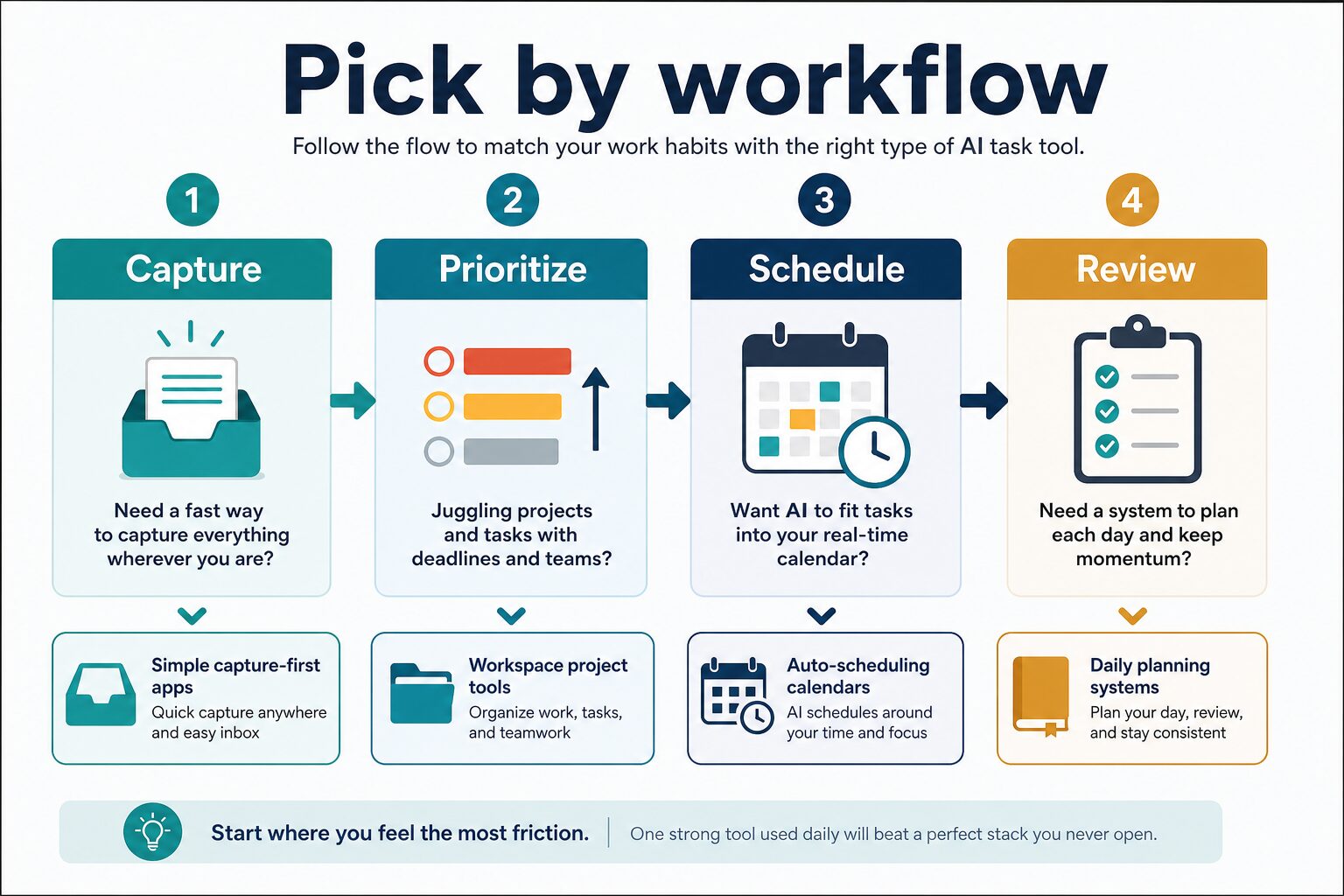
If you are not sure, do not start with the most powerful tool. Start with the workflow step that creates the most friction: capture, prioritize, schedule, or review.
How We Selected These AI Task Management Tools
For this article, AI Work Toolkit prioritized tools that map to real professional workflows rather than tools that merely add an AI label to a to-do list. Each tool had to fit at least one practical use case: capturing tasks, organizing projects, turning tasks into a calendar plan, or helping with a daily/weekly review.
Evidence label: all tool notes in this article are official research only. That means pricing, plan names, and feature descriptions come from official sources, but the article does not claim measured scheduling accuracy, AI output quality, setup speed, or long-term habit change.
Comparison Table
| Tool | Best fit | Free or trial path | Pricing caveat checked June 11, 2026 | Who should skip it |
|---|---|---|---|---|
| Todoist | Fast personal task capture and simple lists | Free Beginner plan shown on official pricing page | Official page confirms Pro and Business plans; exact displayed price should be checked on Todoist’s pricing page before upgrading. | Skip if you need AI to automatically schedule your calendar. |
| ClickUp Brain | Project tasks, team workspaces, documents, and dashboards | Free ClickUp plan exists; AI is a paid/product-tier consideration | Official pricing fetch showed Unlimited at $7/user/month and Business at $12/user/month billed yearly, plus Brain AI pricing from $9/user/month. | Skip if you only need a lightweight personal to-do list. |
| Notion AI | Notes, docs, lightweight project pages, and knowledge work | Free Notion plan exists | Official pricing fetch showed Plus at $10/member/month and Business at $20/member/month, with AI credit details on the pricing page. | Skip if your main need is automatic calendar scheduling. |
| Motion | AI calendar planning and task scheduling | Trial/plan availability should be checked on Motion’s pricing page | Official pricing page data showed Pro AI team pricing from $19-$29/seat/month depending on billing, and higher individual pricing. | Skip if you do not want a tool making calendar-placement decisions. |
| Reclaim | Smart calendar blocking for tasks, habits, and meetings | Lite free plan shown on official pricing page | Official pricing fetch showed Starter at $10/seat/month and Business at $15/seat/month. | Skip if your calendar is not the main constraint. |
| Sunsama | Daily planning, review rituals, and sustainable focus | 14-day free trial shown, no credit card required | Official pricing metadata says $25/month per person or $20/month yearly; current page experiment text also showed $22/month billed monthly. | Skip if you want aggressive automation rather than guided planning. |
Best For Fast Task Capture: Todoist
Todoist is the safest first stop when your main problem is that tasks are scattered across email, chat, meetings, and your head. Its advantage is not that it is the most automated option. It is that a simple task inbox is often enough to reduce mental load.
Choose Todoist if you want fast capture, recurring tasks, projects, and a familiar personal task system. The official pricing page confirms a free Beginner plan and paid Pro/Business plans, but you should check the current pricing page before upgrading because the fetched page did not expose a stable numeric price in plain text.
Skip Todoist if you want AI to rebuild your workday automatically. It is better as a clean task home than as a calendar brain.
Best For Team Projects: ClickUp Brain
ClickUp Brain makes the most sense when tasks sit inside a larger project workspace. If your work includes docs, milestones, assignees, dashboards, comments, and team deadlines, a simple to-do app may not be enough context.
The official ClickUp pricing page describes a free plan and paid workspace tiers. In the fetched official page data, Unlimited was shown at $7/user/month billed yearly, Business at $12/user/month billed yearly, and Brain AI pricing from $9/user/month. Treat those numbers as a pricing snapshot, not a permanent promise.
Choose ClickUp if your team already needs project management depth. Skip it if your problem is personal focus. The setup overhead can be real, and a busy solo operator can lose time maintaining a system that was built for larger workflows.
Best For Workspace Notes And Tasks: Notion AI
Notion AI is a better fit when tasks are attached to notes, documents, project pages, meeting summaries, or operating procedures. It is not mainly an auto-scheduler. Its value is strongest when your task decisions depend on written context.
The official Notion pricing page fetch showed a free plan, Plus at $10/member/month, and Business at $20/member/month, with AI credit details on the pricing page. Notion also publishes AI security and privacy practices, which is important if your workspace contains company knowledge or client notes.
Choose Notion AI if your tasks live beside documents and project knowledge. Skip it if all you need is a fast list or calendar automation.
Best For AI Calendar Scheduling: Motion
Motion is for readers whose task list is not the issue; the calendar is. If your problem is deciding when tasks should happen, an AI calendar planner can be more useful than another list.
Motion’s official pricing page data showed Pro AI features such as AI projects and tasks, AI calendar and meetings, AI docs, and an AI task planner. The fetched pricing data showed Pro AI team pricing from $19-$29/seat/month depending on billing, with higher individual pricing and a Business AI tier.
Choose Motion if you want tasks placed into your calendar and you are willing to let a system make scheduling decisions. Skip it if your calendar is controlled by a manager, clients, family constraints, or a workplace policy that makes automated scheduling hard to trust.
Best For Calendar Blocking With Team Awareness: Reclaim
Reclaim is also calendar-first, but its fit is slightly different. It is useful when you want tasks, habits, and meeting availability to coexist in a smarter calendar. The official pricing page describes a Lite free plan and paid Starter and Business plans; the fetched page showed Starter at $10/seat/month and Business at $15/seat/month.
Choose Reclaim if your main pain is protecting focus time while still coordinating with a team. Skip it if you do not want to connect calendar data or if your company has strict rules about third-party scheduling tools.
Best For Daily Planning: Sunsama
Sunsama is less about replacing your judgment and more about making planning deliberate. That can be a strength for professionals who keep switching tools because every system becomes too complicated after a week.
The official Sunsama pricing page showed a 14-day trial with no credit card required. Official pricing metadata says Sunsama costs $25/month per person or $20/month yearly, while the fetched page experiment text also showed $22/month billed monthly. Before paying, check the live pricing page because the displayed value can vary by experiment or billing view.
Choose Sunsama if you want a daily planning ritual and a calmer review loop. Skip it if you want AI to automatically build a full project-management system.
Privacy And Workplace Data Cautions
AI task management tools often touch sensitive context: project names, client work, meeting notes, deadlines, calendars, habits, and personal availability. Before connecting a tool, check your employer’s AI policy and the vendor’s current privacy or security documentation.
Do not paste confidential client data, HR details, student records, medical information, legal details, financial records, private sales pipeline notes, or unreleased product plans into an AI workflow unless your organization has approved that use. For a broader checklist, see AI Tool Privacy Checklist for Professionals.
How To Choose Without Overbuilding Your System
Use this simple order:
- If tasks disappear before you record them, start with Todoist or another capture-first task app.
- If tasks are tied to team projects, compare ClickUp Brain with your current workspace before migrating everything.
- If your task list is clear but your calendar is impossible, compare Motion and Reclaim.
- If you plan too much and execute too little, try a daily review system such as Sunsama before adding more automation.
- If tasks live inside notes and documents, consider Notion AI as part of a broader workspace.
The best first move is usually smaller than the tool vendors suggest. Pick one workflow problem, run it for a week, and only then decide whether the paid tier is worth it.
Useful Internal Comparisons
If you are building a broader work setup, compare this article with our guide to AI productivity tools for solo operators and small teams. If budget is the main issue, start with Best Free AI Tools for Work before paying for a dedicated task manager.
Official Sources Checked
Official pages checked on June 11, 2026: Notion AI, Notion pricing, Notion AI security and privacy practices, ClickUp AI, ClickUp pricing, Todoist pricing, Motion pricing, Sunsama pricing, and Reclaim pricing.
Final Recommendation
For most busy professionals, the practical answer is this: do not choose an AI task management tool by feature count. Choose by bottleneck. Todoist is the cleanest starting point for capture. ClickUp Brain and Notion AI make more sense when tasks belong inside a larger workspace. Motion and Reclaim are for calendar pain. Sunsama is for people who need a steadier review habit.
Try the smallest tool that solves the current friction. If it helps for a week without adding another system to maintain, then check the official pricing page and decide whether the paid plan is justified.