ChatGPT vs Claude vs Gemini for Work: Which Should You Use?
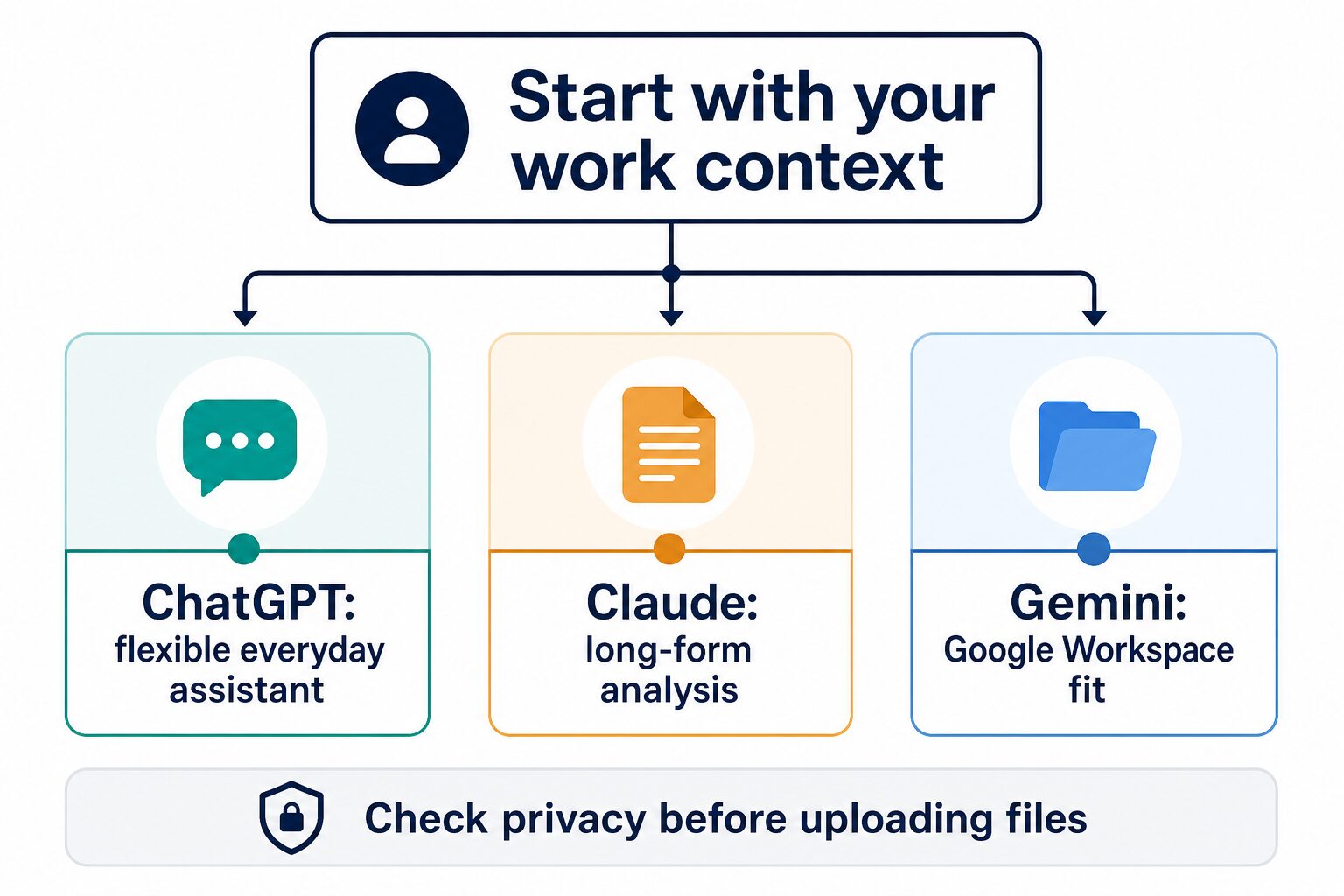
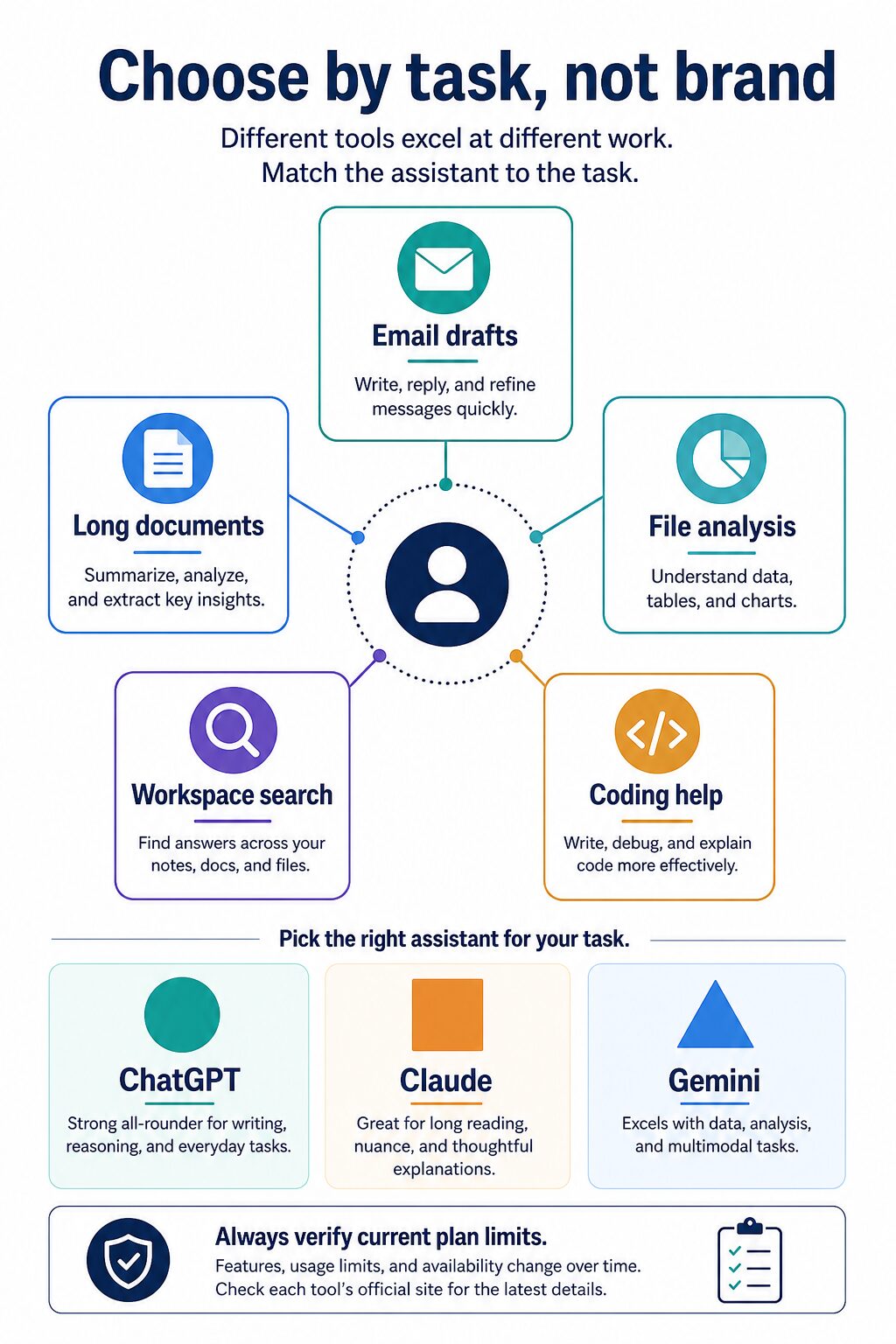
If you are choosing between ChatGPT, Claude, and Gemini for work, do not start with the model leaderboard. Start with the job you repeat every week. ChatGPT is the safest first trial for mixed everyday work, Claude is the better first trial for long documents and careful writing, and Gemini is the cleaner fit when your real work already happens inside Google Workspace.
The practical answer changes when your data risk changes. A solo operator rewriting public marketing copy can experiment faster than a team handling client files, HR notes, legal drafts, student records, source code, or financial information. If your workplace has an approved AI account, use that path first. If it does not, test with public or anonymized examples until the privacy and admin controls are clear.
This rewrite uses official product, pricing, help, privacy, and security pages checked on July 7, 2026. It is not a hands-on benchmark test, so the tool sections use an official research only evidence label. Plan names, model access, context limits, regional availability, and prices can change quickly, so verify the official pages before paying or uploading work files.
For related decisions, compare our guides to best free AI tools for work, the practical AI tool stack for non-native English professionals, ChatGPT Team vs Claude Team, and Perplexity vs ChatGPT Search for work research.
Quick Verdict: Which Should You Use?
| Choose this first | Best work fit | Why it fits | Pause if… |
|---|---|---|---|
| ChatGPT | Mixed everyday work | Best first trial when one assistant needs to handle drafts, outlines, file questions, code help, quick analysis, and brainstorming. | Your company needs strict admin, residency, compliance, or data controls and has not approved the account type you would use. |
| Claude | Long documents and careful writing | Best first trial when the work is reading, structuring, rewriting, comparing, and explaining long or nuanced material. | Your daily work depends on native Google app integration more than a separate document-centered assistant. |
| Gemini | Google-centered work | Best first trial when Gmail, Docs, Sheets, Drive, Meet, and Workspace admin controls are already the operating system. | You are using a personal Google account for sensitive work, or your Workspace admin has not reviewed Gemini settings. |
How We Compared Them for Work
This article compares the three assistants as work tools, not as permanent winners. A benchmark-style ranking gets stale fast because models, plan names, usage limits, and app integrations keep moving. A work decision should survive those changes.
The comparison uses five criteria:
- Repeated task fit: writing, rewriting, long documents, file analysis, spreadsheet help, coding help, search, and workspace integration.
- Account fit: whether the reader is using a free consumer account, paid individual plan, team plan, business plan, enterprise account, or Google Workspace.
- Privacy review: what the reader needs to check before pasting client, student, HR, legal, finance, or confidential company information.
- Plan clarity: whether official pages explain the current plans and the reader can confirm pricing before buying.
- Skip guidance: who should avoid the tool, wait for workplace approval, or choose an internal alternative.
The original value in this guide is the workflow-first selection test below. It is designed for professionals who need a defensible first choice, not another generic chatbot ranking.
- Pick three safe sample tasks from your real week: one draft, one document question, and one planning or data question.
- Remove confidential names, client details, account numbers, health information, legal facts, and private strategy.
- Try the same safe task in the tool you are considering.
- Score the result on usefulness, review effort, privacy comfort, and whether it fits your existing apps.
- Pay only if the same assistant helps with repeated work, not just one impressive demo.
ChatGPT vs Claude vs Gemini: Work Comparison Table
| Work question | ChatGPT | Claude | Gemini |
|---|---|---|---|
| Everyday drafting | Strong default for mixed emails, outlines, planning notes, lightweight tables, and rapid iteration. | Strong for careful rewriting, clearer prose, long explanations, and tone-sensitive revisions. | Strong when the writing begins or ends in Gmail, Docs, or another Google app. |
| Long documents | Useful when the current plan supports the document length and file workflow you need. | Best first trial for long-form reading, synthesis, and structured analysis. | Useful when the documents are already in Drive or Docs and the account settings are appropriate. |
| Work files and connected apps | Check current plan features, connectors, data controls, and business terms before connecting sensitive data. | Check project, connector, and plan limits before using it as a document workspace. | Best fit when Workspace access, Drive permissions, and admin controls are already part of the team setup. |
| Privacy first step | Review ChatGPT data controls and the difference between consumer and business plans. | Review Anthropic privacy pages and commercial terms for the exact service you use. | Review Gemini Apps privacy for personal accounts and Workspace privacy controls for work accounts. |
| Best upgrade reason | You need one broad assistant for many work tasks and want higher limits or business controls. | You repeatedly handle long, nuanced, or document-heavy work. | You want AI directly inside Google apps and your organization can manage the account path. |
ChatGPT: Best First Trial for Mixed Everyday Work
Evidence label: official research only. ChatGPT is the best first trial if your work changes throughout the day. It can help with an email reply in the morning, a meeting follow-up at noon, a small data question in the afternoon, and a rough project plan before you stop work.
The official ChatGPT pricing page now presents Free, Go, Plus, Pro, Business, and Enterprise paths. The same page says paid plans are priced per user per month, with monthly plans for Go, Plus, and Business and annual plans for Business and Enterprise. Because the pricing page is dynamic and model access changes, verify the current plan details in your own region before upgrading.
For data use, OpenAI’s Data Controls FAQ says ChatGPT data controls let users choose whether conversations help improve models, and it explains where to turn off model training for signed-in accounts. The same FAQ says Temporary Chats are deleted after 30 days, are not used to train models, and may be reviewed only to monitor abuse. For company use, compare those consumer controls with OpenAI’s business privacy and security pages before using confidential data.
Use ChatGPT when…
- You need one flexible assistant for mixed work rather than a narrow specialist.
- You switch between writing, planning, light analysis, file questions, and code explanation.
- You want a fast way to prototype a workflow before choosing specialized tools.
- You can keep confidential data out until the correct account and controls are approved.
Skip or pause ChatGPT when…
- Your organization has not approved the account type for client, employee, student, legal, financial, or health-related content.
- You mainly need native Google app integration and do not want a separate assistant workflow.
- You need a factual answer you can use without human review. You still need to verify outputs against reliable sources.
Claude: Best First Trial for Long Documents and Careful Writing
Evidence label: official research only. Claude is the best first trial when the work is less about a quick answer and more about reading, comparing, structuring, and rewriting. It is a strong fit for policy notes, research summaries, proposals, transcripts, long briefs, and writing where tone matters.
The official Claude pricing page lists Free, Pro, Max, Team, and Enterprise tiers. As of this check, the page lists Pro at $17 per month with annual billing or $20 monthly, Max from $100 per month, Team standard seats at $20 per seat per month annually or $25 monthly, and Premium seats at $100 per seat per month annually or $125 monthly. Anthropic also states that usage limits apply and plans can change, so verify the page before buying.
For business data, Anthropic’s commercial terms say customers retain rights to inputs and own outputs to the extent permitted by law, and that Anthropic may not train models on customer content from services covered by those commercial terms. The same terms warn that users are responsible for evaluating whether outputs are appropriate and that factual assertions should be checked independently. Consumer Claude use can follow different terms, so match the privacy review to your account type.
Use Claude when…
- Your work includes long reports, policies, transcripts, source documents, or complex project context.
- You want careful rewriting, calmer structure, and less rushed explanation.
- You need a document-centered assistant more than an app ecosystem.
- You can verify current plan limits and data terms for the exact Claude product you use.
Skip or pause Claude when…
- Your work is mostly inside Google Workspace and native Google controls matter most.
- Your team has approved a different AI assistant for sensitive work.
- You mainly need meeting recording, CRM automation, design production, or no-code workflows rather than document analysis.
Gemini: Best First Trial for Google-Centered Work
Evidence label: official research only. Gemini is the best first trial when the assistant needs to live close to Gmail, Docs, Sheets, Slides, Drive, Meet, Calendar, and Search. The advantage is workflow fit: fewer exports, fewer copy-paste steps, and a clearer admin path for Google-centered teams.
The official Google AI plans page now presents Google AI Plus, Google AI Pro, and Google AI Ultra options, with different storage, Gemini, creative, study, coding, and Google app benefits. The page also notes that availability and some benefits vary by country or product. For business use, Google’s Workspace AI page is the better starting point because it describes Gemini in Gmail, Docs, Sheets, Meet, Drive, and other Workspace apps.
For privacy, the Gemini Apps Privacy Hub says Gemini Apps information can include prompts, uploaded content, Gemini Live interactions, app and device information, connected app data, location information, and subscription information. It also says users can review and delete activity and change auto-delete settings, but reviewed chats and related data may be retained for up to three years. For Workspace, Google says company data in Workspace is not used to train Gemini models or for ads targeting and that Workspace admins can use controls such as data loss prevention and access restrictions.
Use Gemini when…
- Your work already lives in Google Workspace or a managed Google account.
- You want AI support near Gmail, Docs, Sheets, Drive, Slides, Meet, or Search workflows.
- Your Workspace admin can review Gemini settings, access, retention, and data controls.
- You prefer a tool that fits the current collaboration stack over a separate chat workspace.
Skip or pause Gemini when…
- You would use a personal Google account for confidential work files.
- Your organization has not reviewed Gemini Apps or Workspace AI controls.
- Your main problem is long independent document analysis outside Google files.
Privacy Checks Before You Upload Work Files
For professional use, privacy is part of the product decision. Before you paste a transcript, attach a client file, connect Google Drive, analyze HR notes, or summarize a legal draft, check these five points:
- Account type: consumer, paid individual, team, business, enterprise, education, and Workspace accounts can have different rules.
- Training controls: confirm whether prompts, files, responses, or chats may be used for model improvement and whether you can disable that use.
- Retention: check how long chats, uploaded files, reviewed content, logs, and connected app data can be retained.
- Connected data: review permissions for Drive, Gmail, Calendar, Slack, Notion, GitHub, CRM, meeting tools, browser agents, and uploaded files.
- Data sensitivity: remove names, client secrets, student records, HR facts, account numbers, medical/legal/financial facts, and confidential strategy unless your organization explicitly allows that use.
A practical rule: if you would not send the file to an outside vendor without approval, do not paste it into a consumer AI chat just because the interface feels private.
Scenario-Based Recommendations
If you write emails, proposals, and everyday notes
Start with ChatGPT if you want the broadest everyday assistant. Try Claude if tone, nuance, and longer rewriting are the main pain points. Choose Gemini if the work starts and ends in Gmail or Google Docs.
If you analyze long documents
Start with Claude when the core task is reading, explaining, comparing, or rewriting long material. Use ChatGPT if the same workflow also needs coding help, mixed analysis, or broader tool experimentation. Use Gemini when the source documents are already in Drive or Docs and the account settings are appropriate.
If your team runs on Google Workspace
Start with Gemini through the correct Workspace path. A Google-centered team should not choose a separate assistant just because a model comparison says it is stronger in one narrow task. The admin and data-control path may matter more than raw chatbot preference.
If privacy approval is unclear
Use public examples only, or wait. You can still ask an assistant to create a generic checklist, outline, rewrite rubric, spreadsheet formula explanation, or meeting agenda without uploading the real confidential file.
If you are choosing for a small business
Choose by operating system. If your company lives in many apps, ChatGPT is the flexible first trial. If your deliverables are document-heavy, Claude is the first trial. If Gmail, Docs, Sheets, and Drive are the center of work, Gemini is the first trial. For broader setup decisions, read our guide to AI tools for small business owners.
FAQ
Is ChatGPT better than Claude and Gemini for work?
Not for every worker. ChatGPT is the best first trial for mixed everyday tasks, Claude is often the better first trial for long documents and careful writing, and Gemini is the better first trial for Google-centered work. The right choice depends on the repeated task, account type, and data risk.
Is Claude better than ChatGPT for writing?
Claude is a strong first trial for careful long-form writing and revision, but this article does not claim a hands-on output-quality ranking. If writing quality matters, test the same non-confidential sample in both tools and compare how much editing you still need.
Is Gemini the right choice if I use Gmail and Google Docs?
Often yes, especially if your organization uses Google Workspace and can manage Gemini through the correct account and admin settings. For a personal Google account, check Gemini Apps privacy and activity settings before using work data.
Which one should I pay for first?
Pay only after a free or low-risk trial proves repeated value. Start with ChatGPT for mixed tasks, Claude for long documents, or Gemini for Google Workspace. Then verify the current official pricing page and the privacy terms for the exact account type you will use.
Can I use these tools with client files?
Only after checking client agreements, workplace policy, account type, data controls, retention, and official privacy terms. When in doubt, remove identifying details or use a generic sample instead of the real file.
Final Recommendation
For most professionals, the best first move is simple: try ChatGPT first for mixed everyday work, Claude first for long-form analysis and careful writing, and Gemini first when your work already lives in Google Workspace. That is not a permanent ranking. It is a practical starting point.
The better decision is the one you can defend: this is my repeated task, this is my account type, this is the data risk, this is the official pricing and privacy page I checked, and this is why the assistant fits. Start with low-risk examples, upgrade only after repeated value, and use the workplace-approved path for sensitive data.