Best AI Tools for Bloggers Who Want Better English Content
Best AI tools for bloggers
If you are choosing AI tools for blogging, do not start with the longest tool list. Start with the part of the next three posts that is actually stuck: the angle, the outline, the English edit, the visual, the SEO brief, the newsletter reuse, or the trust checks before publishing.
The lean starter stack is one general AI assistant, one editing layer, one visual workflow, and one SEO optimizer only when search traffic is a serious channel. Run a three-post bottleneck scorecard before paying for multiple tools; it keeps the blog useful instead of turning it into a pile of subscriptions and generic AI text.
Evidence note: This guide is based on official product and pricing pages checked again on July 8, 2026. It uses official-research-only labels and editorial workflow judgment. It does not claim hands-on testing, traffic lift, output-quality benchmarks, ranking gains, affiliate clicks, conversions, or revenue.
Quick Verdict
Most solo bloggers should start with ChatGPT or Claude for planning, briefs, draft structure, headline options, and repurposing ideas. Add Grammarly only when English polish and sentence-level confidence are slowing publication. Add Canva when each post needs a repeatable visual system. Use Notion AI only if your calendar, briefs, source notes, and publishing checklist already belong in Notion. Add Surfer or Frase only when SEO content is frequent enough to justify specialist optimization software.
Fast rule: Buy tools by bottleneck, not by category. If the next three posts are blocked by weak examples and unclear positioning, another SEO score will not fix the article. If they are blocked by missing briefs and search intent, a grammar tool alone will not fix the workflow. If they are blocked by weak social previews or no newsletter follow-up, the writing assistant is not the only layer to improve.
Best AI Blogging Stack By Workflow Stage
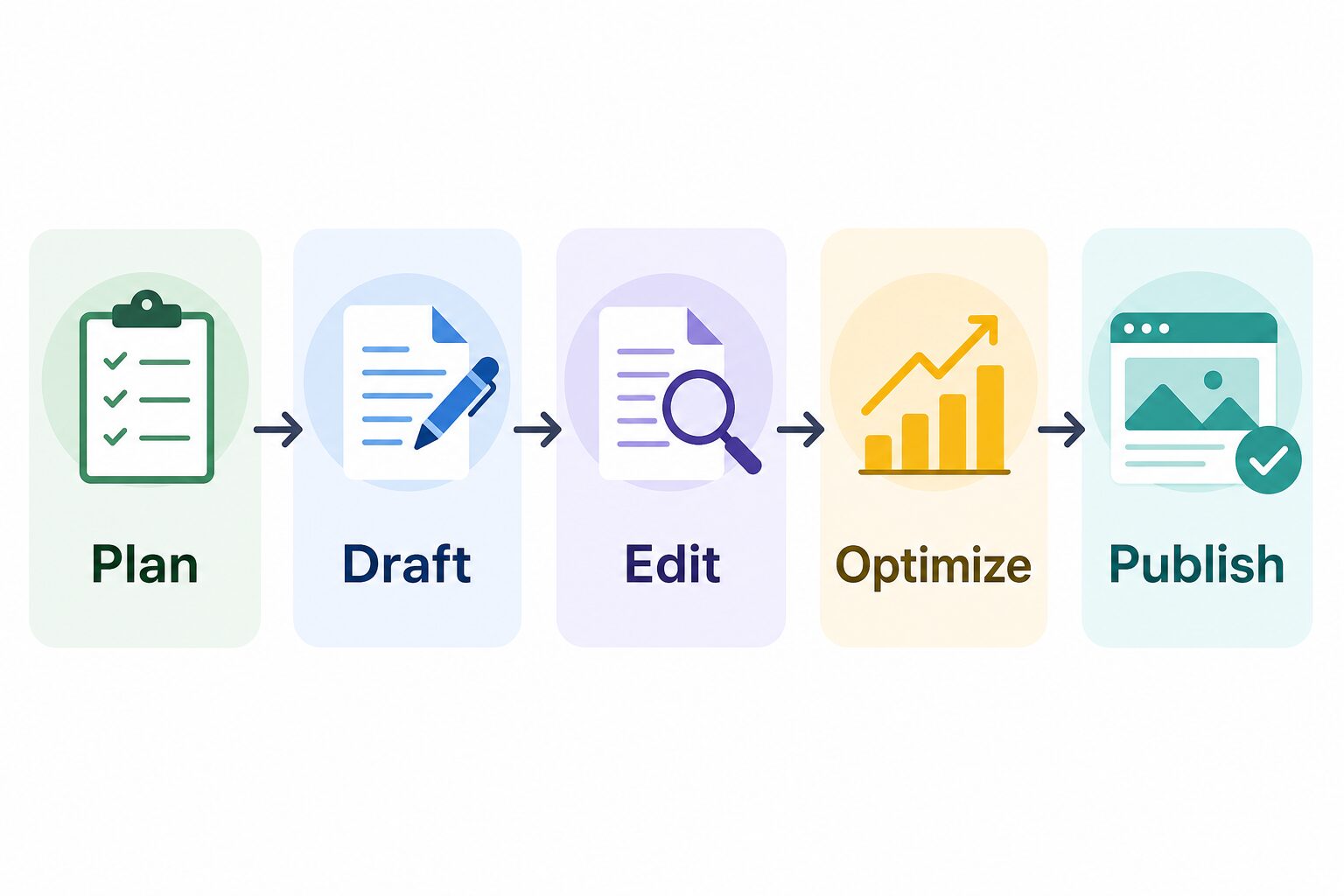
A good blogger stack should reduce friction without removing the parts that make a post worth reading: original examples, product judgment, reader empathy, source verification, and final editing.
Use ChatGPT or Claude to map reader questions, angles, objections, outline options, and missing examples before drafting.
Ask for section-level drafts from your notes and source list. Avoid asking the tool to invent a full post from a blank prompt.
Use Grammarly, Claude, ChatGPT, or a manual checklist to improve clarity, transitions, tone, and repetition.
Use Surfer or Frase when you publish SEO-focused content often enough to use briefs, content gaps, audits, and internal-link suggestions.
Use Canva for visual assets and connect the finished article to a repeatable newsletter, social, or content calendar workflow.
Keep private client drafts, unpublished business details, student data, and sensitive screenshots out of tools unless the plan and policy allow it.
Comparison Table: AI Tools For Bloggers
| Tool | Best blogger job | Current official-plan note checked July 8, 2026 | Use it when | Skip it when |
|---|---|---|---|---|
| ChatGPT | Ideas, outlines, draft variations, title/meta options, content repurposing, and flexible prompt work. | Official ChatGPT pricing lists Free, Go, Plus, Pro, Business, Enterprise, Edu, and Teachers plan paths. Plus is listed at $20/month; higher tiers and business plans vary by plan. | You need one flexible assistant before buying specialist blogging tools. | You need built-in SEO scoring, a full editorial calendar, or a visual design suite as the main job. |
| Claude | Long-form structure, thoughtful rewrites, editorial critique, and working through messy notes. | Official Claude plan guidance lists Free at $0, Pro at $20/month or $200/year, Max 5x at $100/month, and Max 20x at $200/month, with Team and Enterprise paths also available. | Your drafts need better reasoning, organization, and tone review. | You mainly need grammar correction, templates, or SEO quotas. |
| Grammarly | Sentence-level English polish, tone adjustment, full-sentence rewrites, plagiarism checks, and AI text detection on paid tiers. | Official Grammarly Pro support lists monthly, quarterly, and annual billing, including $144/year or a $12/month annual average; the plans page also shows a 7-day trial flow. | You publish in English and want a dedicated final editing layer. | Your bottleneck is research depth, visuals, or search-intent planning instead of final wording. |
| Canva | Featured images, diagrams, Pinterest/social graphics, simple brand templates, and AI-assisted creative workflows. | Official Canva AI says AI features are available on the Free plan with higher usage and advanced features on paid plans; official pricing separates Free, Pro, Business, and Enterprise paths. | Your blog needs repeatable visual assets and social preview images. | You already have a reliable design workflow or publish only text-heavy articles. |
| Notion AI | Content calendar, briefs, source notes, status tracking, reusable checklists, and workspace search. | Official Notion pricing lists Free, Plus, Business, and Enterprise paths; current AI language emphasizes limited trial usage on lower plans and broader AI capabilities on Business and Enterprise. | Your blog operations already live in Notion or can reasonably move there. | You do not want to manage content, notes, and tasks in Notion. |
| Surfer | SEO content optimization, AI visibility tracking, content gaps, internal linking, and on-page guidance. | Official Surfer pricing positions the product for AI search and content intelligence, with Standard shown at $99/month billed yearly and higher tiers for larger workflows. | Search traffic is central and you publish enough SEO content to use the quotas. | You publish casually or do not have enough posts to justify a paid SEO platform. |
| Frase | SEO/GEO research, briefs, optimization, audits, AI visibility tracking, publishing support, and internal linking. | Official Frase pricing lists Starter, Professional, and Scale paths, with Starter from $39/month billed yearly or $49 month to month and a 7-day free trial. | You want repeatable briefs, optimization, audit pages, and internal linking in one content workflow. | You only need occasional brainstorming or one-off editing help. |
Which Tool Should You Try First?
If you are starting from scratch, choose by the next publishing bottleneck. This is the shortest practical audit:
- You have ideas but no structure: try ChatGPT or Claude first.
- You write in English but spend too long polishing: add Grammarly before another drafting tool.
- Your posts look unfinished on social or in newsletters: build a simple Canva visual system.
- Your notes, briefs, and publishing checklist are scattered: use Notion AI only if Notion is already your workspace.
- You publish SEO posts every week: test Surfer or Frase against your real cadence.
- You publish one or two posts a month: delay specialist SEO software until manual SERP review is no longer enough.
- Your blog is hard to monetize cleanly: fix trust, disclosures, and link management before adding more creator tools.
For a broader writing-tool comparison, read Best AI Writing Tools for Work. For SEO-specific article workflows, compare this guide with Best AI SEO Writing Tools for Small Content Sites. For turning finished posts into other formats, use How To Use AI To Repurpose Blog Posts Into Newsletters and Social Posts and Best AI Tools for Content Repurposing. If email list growth is part of the plan, compare the stack with Best AI Newsletter Tools for Solo Creators.
The Three-Post Trial Before You Pay
Before upgrading several tools, run the same stack through three real posts. This gives you better evidence than a generic feature list because blogging bottlenecks show up in sequence: idea quality, draft quality, editing time, visual production, search optimization, and the ability to repurpose the finished post.
Use one assistant to map reader questions, draft from your notes, and create a source checklist. Measure whether the article has clearer examples, not whether the AI wrote more words.
Add an editing layer and a decision table. If the article still feels generic, the missing piece is usually criteria and evidence, not another drafting subscription.
Only then test Surfer or Frase against a real SERP brief, content gaps, internal links, and update workflow. If you publish rarely, keep this as a manual checklist for now.
Pay for the layer that repeatedly saves time or improves decisions. Cancel or skip tools that only create extra dashboards, generic copy, or workflow clutter. If no paid layer changes the final article, stay with official/free plans for another cycle.
Pay-only-if checklist: upgrade only when the same bottleneck appears in at least two of the three posts, the paid feature fixes that bottleneck directly, the tool’s data-use terms fit your content, and the workflow will still be simple enough to repeat next month.
Blogger Bottleneck Scorecard
Use this scorecard before choosing a paid plan. Give each row a simple 0, 1, or 2 after each of your next three posts: 0 means the tool did not help, 1 means it helped a little, and 2 means it clearly improved the finished article or saved repeatable effort.
| Bottleneck | Tool layer to test | What a good result looks like | Upgrade signal |
|---|---|---|---|
| Angle and outline | ChatGPT or Claude | The post has a sharper promise, fewer generic sections, and clearer examples before drafting. | Two posts score 2 for structure or idea quality. |
| English polish | Grammarly, Claude, or a manual edit checklist | The final draft is clearer without sounding fake, over-polished, or detached from your voice. | Editing time drops on at least two posts without weakening meaning. |
| Visual production | Canva or another approved visual workflow | The featured image, article diagram, and social preview match the article’s actual promise. | You reuse the same brand/template workflow without rebuilding every image from scratch. |
| SEO brief and update work | Surfer or Frase | The brief improves search intent, missing subtopics, internal links, and update priorities. | You publish enough search-focused posts to use the monthly quota. |
| Publishing operations | Notion AI, Notion, or a simpler checklist | Briefs, source notes, status, visuals, and repurposing tasks stop getting lost. | The workspace saves repeatable coordination work, not just note-taking clutter. |
Tool Notes From Official Sources
ChatGPT is the broadest starting layer for bloggers who need reader questions, outline options, draft alternatives, title/meta ideas, FAQ drafts, and repurposing prompts. Official pricing checked July 8 lists Free, Go, Plus, Pro, Business, Enterprise, Edu, and Teachers plan paths, with Plus listed at $20/month. Use it as the flexible first layer, then check the current official page before upgrading.
Claude fits bloggers who need help turning rough notes into a more organized article, finding weak reasoning, or improving tone without making the post feel like a generic template. Official Claude plan guidance checked July 8 lists Free, Pro, Max 5x, and Max 20x individual paths, plus Team and Enterprise options. Treat usage limits, model access, and team controls as check-before-upgrade details because plan terms can change.
Grammarly is a practical final editing layer for bloggers who want clearer English, tone checks, full-sentence rewrites, plagiarism checking, AI text detection, and fewer sentence-level distractions before publishing. Official Grammarly plan/support pages checked July 8 list Free and Pro paths, annual Pro pricing at a $12/month average, and other billing intervals. For non-native English writers, the goal is not to erase your voice. The goal is clearer professional English that keeps your meaning intact.
Canva is useful when a blog needs featured images, simple diagrams, Pinterest graphics, social previews, newsletter graphics, or reusable brand templates. Official Canva AI/pricing pages checked July 8 say AI features are available on Free with higher usage and more advanced features on paid plans. Canva is still treated as a neutral official-link option here because no verified monetized route is available for this article.
Notion AI makes sense when your blog workflow needs a content calendar, reusable briefs, source notes, status views, publishing checklists, and workspace search in one place. Official Notion pages checked July 8 list Free, Plus, Business, and Enterprise paths, with broader AI capabilities emphasized for Business and Enterprise and limited trial usage on lower plans. Skip it if you do not want Notion to become the operating system for your blog.
Surfer is a specialist SEO and AI-search visibility layer. Its official pricing page checked July 8 positions the product around AI search, content intelligence, optimization, content gaps, internal linking, AI visibility tracking, and rank monitoring, with Standard shown at $99/month billed yearly. It is easier to justify when you publish search-focused articles often enough to use those workflows, not when you only need occasional brainstorming.
Frase positions itself around research, SEO/GEO optimization, AI visibility, site audits, publishing, and internal linking. Its official pricing page checked July 8 describes Starter, Professional, and Scale plan families, with Starter from $39/month billed yearly or $49 month to month and a 7-day free trial. It is a better fit when you need repeatable briefs and optimization workflows, not just an occasional idea generator.
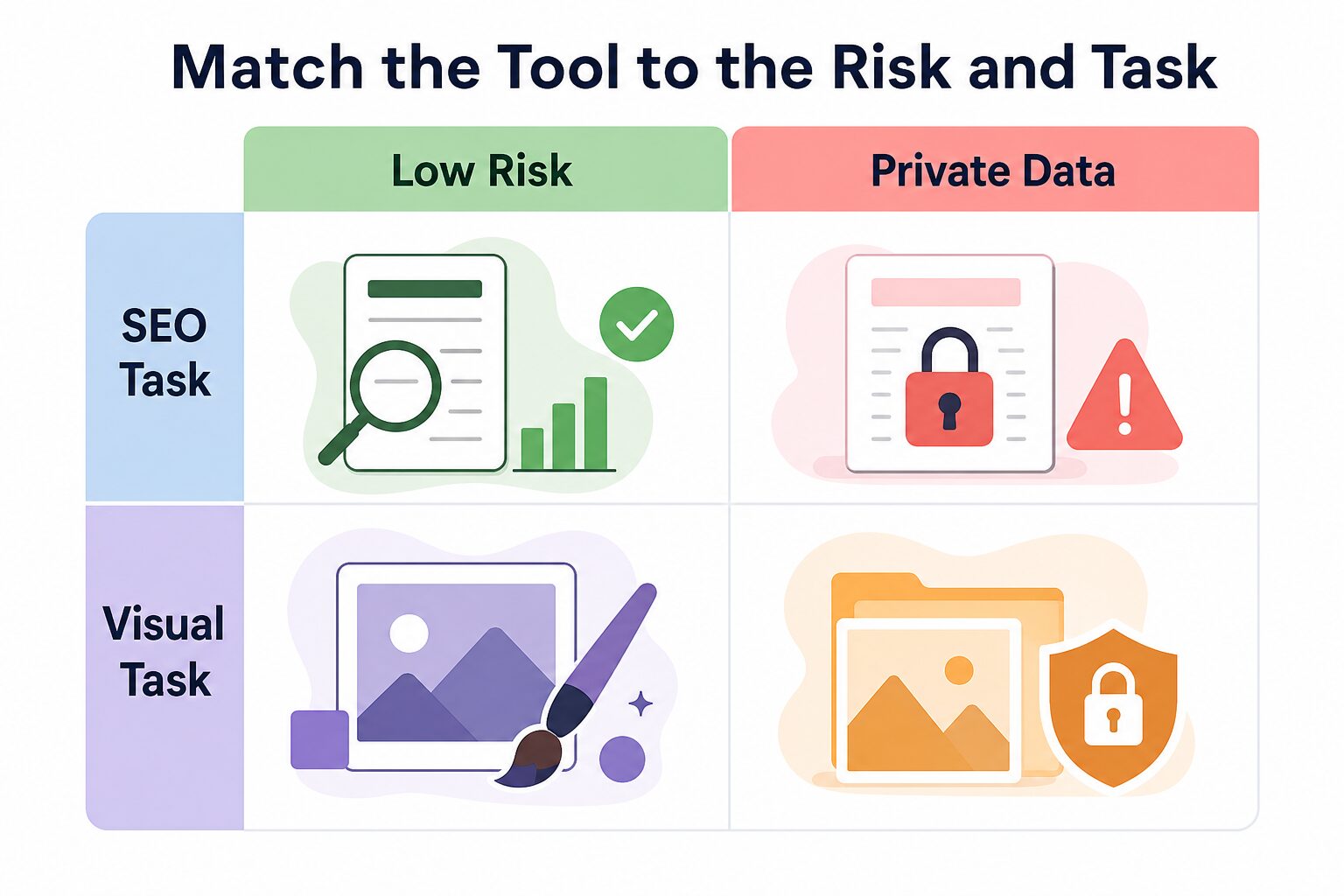
Match The Tool To The Risk And Task
Blogging can feel low risk because much of the work is public. That changes quickly when you paste client notes, unpublished business plans, paid newsletter drafts, student information, legal details, health stories, financial information, or private screenshots into a tool.
| Task | Lower-risk input | Higher-risk input | Safer habit |
|---|---|---|---|
| Brainstorming | Public topic ideas, audience questions, generic outlines, public competitor examples. | Private client examples, unpublished offers, paid-course material, confidential interviews. | Use placeholders and remove identifying details. |
| Drafting | Your own notes, approved source lists, anonymized examples, public documentation. | Workplace documents, legal or medical details, private revenue notes, unreleased strategy. | Check the tool’s data-use policy and your own permissions first. |
| SEO optimization | Published page text, target keyword, public SERP patterns, current internal links. | Internal conversion data, unpublished campaign plans, private client keyword strategy. | Keep sensitive strategy outside optimization prompts. |
| Visuals | Generic blog concepts, article titles, approved brand colors, public screenshots you own. | Client dashboards, private analytics, personal photos without consent, licensed assets you cannot reuse. | Use abstract scenes unless rights and permissions are clear. |
For a more detailed review before using AI with sensitive work material, use the AI Tool Privacy Checklist for Professionals.
Common Mistakes Bloggers Make With AI Tools
- Buying before diagnosing the bottleneck: if your outlines are weak, a visual tool will not fix the article.
- Letting AI flatten the voice: add your own examples, opinions, screenshots, process notes, and reader-specific context.
- Optimizing for a score instead of usefulness: SEO tools are helpful, but a high score does not automatically make a helpful post.
- Skipping source verification: always check official pricing, free-plan limits, feature pages, and privacy/security pages before publishing claims.
- Pasting sensitive drafts into consumer tools: treat client, student, workplace, health, legal, and financial content as restricted unless approved.
- Using AI visuals without QA: check spelling, composition, alt text, and whether the image supports the section.
- Adding automation too early: automate only after the editorial workflow is stable enough to repeat.
- Confusing monetization with trust: if affiliate links are part of the blog, make disclosures, link destinations, and recommendation logic clear before scaling content.
A Simple Starter Stack For The Next Three Posts
- Plan in ChatGPT or Claude. Ask for reader questions, outline options, source gaps, counterarguments, and examples the article should include.
- Draft from your own notes. Give the AI your angle, source list, audience, constraints, and examples. Do not ask for a generic full post from nothing.
- Edit with Grammarly or a manual checklist. Check clarity, tone, repetition, transitions, claims, and whether every recommendation has a reason.
- Create one useful visual in Canva or another approved visual workflow. Make sure text is readable, alt text is accurate, and the image explains something real.
- Use Surfer or Frase only when the SEO workflow is repeatable. Test one specialist tool against your actual publishing cadence before paying for multiple platforms.
- Repurpose after the article is finished. Turn the final post into newsletter and social drafts only after the source article is clear and checked.
If you want automation after the article is drafted, read Best AI Automation Tools for Simple Workflows and Zapier Alternatives for AI Workflows. If the bottleneck is blog visuals, compare Canva AI Review for Blog and Social Content with Canva vs Adobe Express. If the bottleneck is the site itself, read Best AI Website Builders for Solo Businesses. If monetization links are part of the workflow, review disclosure, destination, and recommendation trust before scaling. Automation helps only after the editorial process is clear.
FAQ
What is the best AI tool for bloggers overall?
For most solo bloggers, the best first tool is ChatGPT or Claude because either can help with planning, outlines, drafting, rewriting, titles, FAQs, and repurposing. Add specialist tools only when the bottleneck is clear and repeats across multiple posts.
Do bloggers need Surfer or Frase?
Not always. Surfer or Frase makes more sense when organic search is important, you publish SEO-focused posts regularly, and you will actually use briefs, optimization checks, audits, AI visibility tracking, and internal-link guidance. Low-volume bloggers can start with manual SERP review and a simpler writing workflow.
Is Grammarly enough for blogging?
Grammarly can be enough when the main problem is final English polish. It is not a complete blog strategy tool. You still need topic selection, source checking, examples, structure, visuals, SEO judgment, and a publishing workflow.
Which AI tool is best for blog images?
Canva is a practical visual layer for many bloggers because it supports design workflows, templates, and AI-assisted creative features. The right choice still depends on whether you need featured images, article diagrams, social graphics, or reusable brand templates.
What should I check before paying for an AI blogging tool?
Check the current official pricing page, usage limits, free-plan limits, trial terms, cancellation terms, export options, privacy/security documentation, and whether the tool fixes a bottleneck you saw in real posts. If it only adds another dashboard, wait.
How many AI tools does a solo blogger actually need?
Usually fewer than a roundup suggests. Start with one assistant, one editing process, and one visual workflow. Add SEO, automation, or workspace tools only when the same bottleneck repeats across multiple posts.
Final Recommendation
Start with one flexible AI assistant, one editing process, and one visual workflow. Publish three posts with that stack before adding a paid SEO optimization platform. When search traffic becomes a serious channel, compare Surfer and Frase against your real publishing cadence instead of buying both because they appear in tool roundups.
The goal is not to publish more AI text. The goal is to publish better English content with clearer structure, stronger examples, safer data habits, clean monetization habits, and a workflow you can repeat without buying a new tool for every article.