7 Best AI SEO Writing Tools for Small Sites (When to Pay)
For many small content sites, the best AI SEO writing tool is no paid tool yet. Buy one only when you have useful pages to update, a repeatable publishing process, and a specific bottleneck the software can remove. Otherwise, a general AI assistant, Search Console, and a careful human edit are usually the leaner starting stack.
Quick Verdict: Buy for the Bottleneck, Not the Score
Start with NeuronWriter when budget is the hard limit. Try Frase when one person needs research, optimization, audits, internal-link help, and AI-visibility monitoring in one workflow. Consider Surfer after optimization and page tracking become recurring work. Choose Clearscope when a content team can use its tracked pages, prompts, and shared operations layer.
Wait
If you do not yet have enough useful pages or a reliable update cadence, build those first.
Test
Use one tool on three important existing posts, not three disposable AI drafts.
Keep
Pay only if it improves decisions, editorial time, or update consistency—not just a content score.
Evidence note: This guide uses official product, pricing, trial, security, privacy, and Google Search pages checked July 11, 2026. It is researched-only, not a hands-on ranking or output-quality benchmark.
Should a Small Site Buy an AI SEO Tool Yet?
A dedicated optimizer is easiest to justify when you already have pages worth improving. If you are still proving the niche, publishing the first useful articles, or operating without even a basic measurement export, more software can hide the real problem.
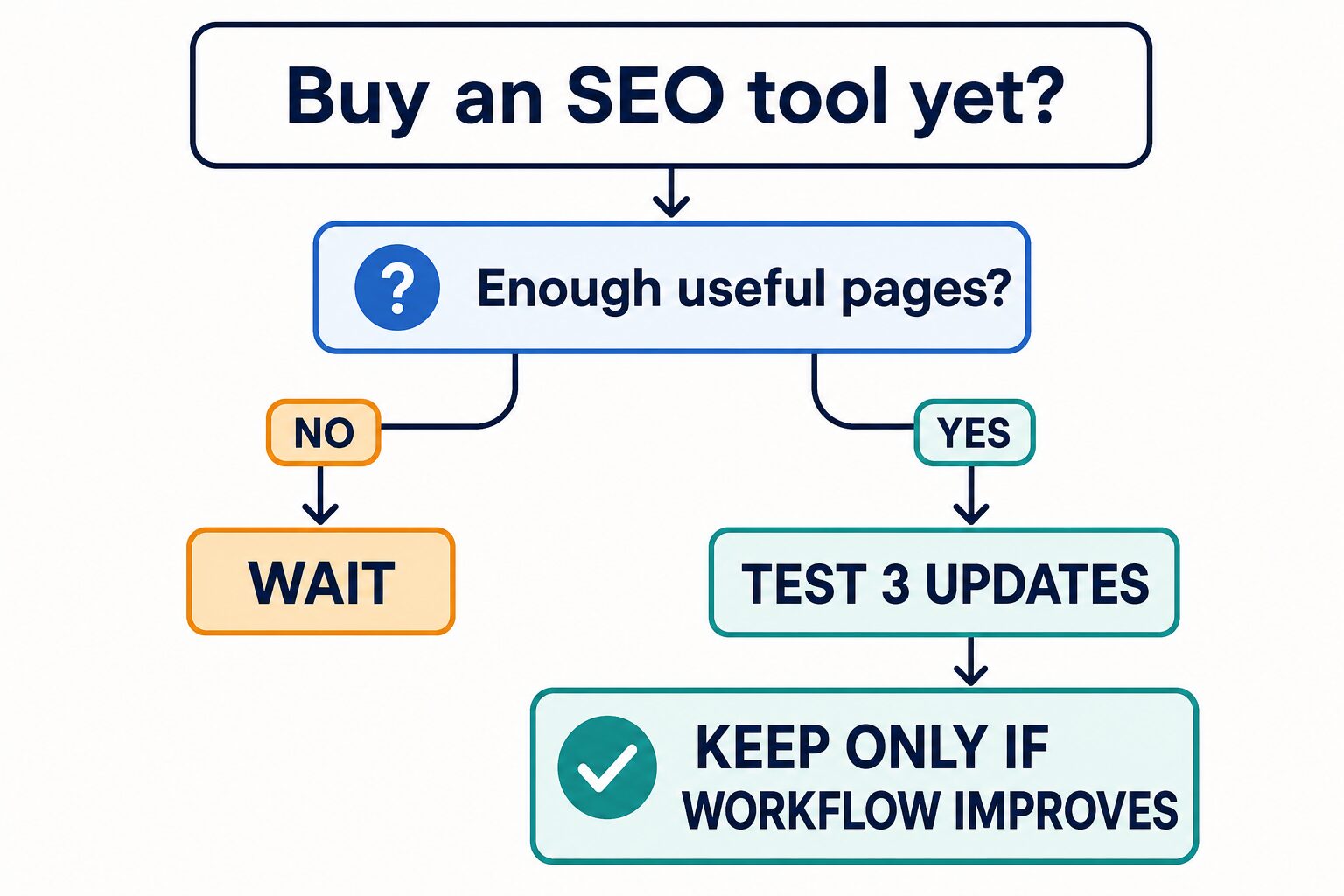
Buy only if you can answer yes to these four questions
- Do you have useful pages to update? An optimizer cannot rescue a site with no clear audience or original value.
- Can you name the bottleneck? Choose research, brief creation, on-page optimization, internal linking, page tracking, or final editing—not “SEO” in general.
- Will you use it every month? A low entry price is still waste if the workflow is occasional.
- Can you measure a before and after? Track editorial time, useful changes shipped, impressions, clicks, and query direction without treating missing data as zero.
7 AI SEO Writing Tools Compared
The first four products below are dedicated content optimization platforms. ChatGPT and Claude are general AI assistants. Grammarly is a final writing and editing layer. Treating all seven as interchangeable is the fastest way to buy the wrong tool.
| Tool | Best small-site role | Official price or trial checked July 11, 2026 | Skip when |
|---|---|---|---|
| NeuronWriter | Lower-cost content analysis and optimization for a solo publisher testing a repeatable process. | Monthly plans start at $23 for Bronze; annual billing shows a $19 monthly equivalent. The official FAQ lists a 7-day Gold-plan trial. | You need mature governance, broad team workflows, or a polished multi-brand operations layer now. |
| Frase | One-site research, SEO/GEO optimization, audits, internal linking, publishing, and AI-visibility monitoring. | Starter is $49 month to month or $39/month billed yearly. The official page lists a 7-day trial with no credit card. | You only need occasional copy editing, or you will not use audits and optimization every month. |
| Surfer | Recurring optimization and tracking once a site already has a content update rhythm. | Discovery is shown at $49/month billed yearly; higher tiers expand tracking and workflow limits. New accounts get a 7-day Pro trial that requires billing details and auto-converts unless canceled. | You are still proving the first content cluster or cannot name which recurring workflow justifies the subscription. |
| Clearscope | Team content operations with tracked prompts, tracked pages, topic exploration, drafts, and shared access. | Essentials is $129/month, Business is $399/month, and Enterprise is custom. No free plan is presented on the pricing page. | You are a solo operator who has not yet proved the update volume or team need. |
| ChatGPT | Outline pressure-testing, source-note organization, drafting, rewriting, and editorial questions after intent is clear. | The official pricing page lists a Free plan plus paid individual and business options. Confirm current local price and limits at checkout. | You expect it to replace SERP research, content inventory, page tracking, or source verification automatically. |
| Claude | Long-form structure, draft critique, synthesis, and logic review around a verified brief. | Free is available; official help lists Pro at $20/month in the US and Max tiers from $100/month. Regional price and tax vary. | You need dedicated keyword, SERP, page inventory, or optimization data rather than writing support. |
| Grammarly | Final grammar, clarity, tone, full-sentence rewrites, and consistency after SEO decisions are complete. | Free is $0; Pro is shown at $12/month with a 7-day trial; Enterprise uses sales pricing. | Your real gap is search intent, briefs, internal links, or content optimization. |
Best Picks by Workflow
Best low-cost first optimizer: NeuronWriter
NeuronWriter is the practical first test when monthly cost matters more than an all-in-one operating layer. The Bronze plan includes two projects and 25 content analyses, which is enough to test whether optimization becomes a real habit.
Use it for: a small number of active sites, structured content analysis, and a lower-cost proof period.
Do not infer: that its optimization suggestions guarantee rankings or that its AI monitoring proves reader value.
Best one-site operating loop: Frase
Frase now bundles research, SEO and GEO optimization, audits, AI visibility, publishing, and API access across its plans. Starter is the clearest fit when one person wants a broader workflow instead of a stand-alone content score.
Use it for: briefs, page audits, internal-link suggestions, and one-domain monitoring.
Check first: whether ten optimized articles and 50 audit pages per month fit your actual output.
Best recurring optimization upgrade: Surfer
Surfer is easier to justify after updates, tracking, and content optimization are already recurring work. Discovery starts smaller; Standard and higher tiers add broader AI tracking and workspace capacity.
Use it for: a repeatable optimization queue and pages you will monitor over time.
Trial caution: the current 7-day trial asks for billing details and converts to the chosen plan unless canceled.
Best team operations layer: Clearscope
Clearscope starts at a higher price, but every plan includes tracked prompts, tracked pages, topic exploration, drafts, unlimited users, and unlimited projects. That is a content-team proposition, not a default solo-blog purchase.
Use it for: shared content operations where multiple people can use the same page and prompt system.
Skip it when: one editor still needs to prove the process with a cheaper optimizer.
Where ChatGPT, Claude, and Grammarly Fit
A general AI assistant can help once the task is defined: organize source notes, challenge an outline, create a counterexample, find missing reader questions, or rewrite a confusing section. Grammarly can then help with sentence-level clarity and consistency.
They do not remove the need to inspect search intent, verify facts, decide what the page adds, or connect the page to the rest of the site. For broader writing-tool choices, compare our AI writing tools for real work. If subscription cost is the first constraint, use the limits in our free AI writing tools guide.
A 3-Post Proof Test Before You Subscribe
Do not evaluate an SEO platform on a blank sample article. Use three existing pages that matter to your audience or business. This exposes whether the product improves an operating decision instead of merely generating a score.
- Choose three different update problems: one weak-intent page, one thin comparison, and one page with stale facts or weak internal links.
- Record the baseline: current title, reader promise, editorial time, known queries, links, and facts. If traffic exports are missing, write `unverified` instead of zero.
- Use one optimizer only: rebuild the brief and identify gaps, but reject terms or sections that do not improve the reader’s decision.
- Ship human-reviewed changes: verify product facts, privacy boundaries, metadata, links, and examples before publishing.
- Judge the workflow: keep the subscription only if it made three updates clearer, faster, or more consistent enough to repeat.
This test cannot prove ranking lift in a week. It can prove whether the software fits your work. Search performance needs a longer, clean measurement window and a current page-level export.
People-First SEO Is the Gate, Not the Bonus
Google Search Central recommends helpful, reliable content created for people and asks whether a page adds original information, research, analysis, or value beyond other results. A content score can reveal gaps, but it cannot decide whether the page deserves to exist.
Google also says generative AI can help with research and structure, while scaled pages with little added value may violate spam policies. For a small site, the safer pattern is one strong page for one real reader task, with current sources, original decision logic, clear authorship, and human review.
Privacy and Source-Control Checklist
Do not paste client briefs, unpublished strategy, student work, legal notes, health information, financial details, or confidential workplace content into a consumer AI or SEO tool without approval.
Plan-level security claims do not replace your employer, client, university, or regulator’s policy. Consumer AI settings and business-workspace commitments can also differ. Redact sensitive material, check training and retention controls, use approved workspaces, and keep source verification outside the generated draft.
Use our AI tool privacy checklist for professionals before uploading real work material.
Small-Site Workflow That Keeps the Tool in Its Place
- Define intent: state the reader task, latent risk, satisfying answer, and what your page adds.
- Build the brief: use the optimizer to find relevant gaps, not to copy every competing heading.
- Draft selectively: use ChatGPT or Claude only after the sources and page angle are clear.
- Add original value: include a realistic workflow, decision checklist, tradeoff, or source synthesis.
- Verify claims: recheck pricing, trials, features, privacy, and security against official pages.
- Edit and link: improve clarity, mobile tables, internal paths, and the next useful action.
- Measure honestly: use page-level Search Console and GA4 exports when available; missing rows in partial exports are not measured zeroes.
For the next production step, use our guide to repurposing blog posts with AI only after the original page is useful. Compare AI tools for bloggers for a wider creator stack, or review the AI website builder checklist before moving the workflow to a hosted platform.
FAQ
What is the best AI SEO writing tool for a small site?
NeuronWriter is the lower-cost first optimizer in this comparison. Frase fits a broader one-site workflow. Surfer makes more sense when optimization and tracking are recurring work. Clearscope is better aligned with a content team. The best choice can still be waiting until the site has enough useful pages to test.
Can ChatGPT or Claude replace an SEO optimizer?
Not completely. They can help with drafting, critique, and synthesis, but they do not automatically replace SERP research, content inventory, page tracking, internal-link analysis, or claim verification.
How many posts should I have before buying?
There is no universal minimum. The practical gate is whether you have enough useful pages and recurring updates to run a real test. This guide recommends testing three important existing posts before committing to a subscription.
Are AI-visibility or GEO scores proof that content is good?
No. They are monitoring signals inside a vendor workflow. They do not prove that the page is accurate, helpful, trustworthy, or likely to convert.
Are there affiliate links in this article?
No. The article uses official product pages and related AI Work Toolkit articles. It does not use a monetized SEO-tool redirect.
Final Recommendation
Wait if the site has no repeatable update process. Test NeuronWriter if budget is the main constraint. Test Frase if one person needs a wider research-to-monitoring loop. Move to Surfer when optimization and tracking are already recurring work. Use Clearscope when a team can actually use the operations layer.
Then judge the tool by the work it changes. If it helps you ship three more useful, better-sourced, better-linked updates, it may earn its place. If it only raises a score, keep the money and improve the editorial system.