Best Free AI Tools for Work: A Practical Starter Stack
The best free AI tool for work is not the one with the longest feature list. It is the one that helps with a repeated task you already do: drafting emails, summarizing source material, making a simple visual, automating a handoff, or capturing meeting notes.
If you want a practical starter stack, begin with one general AI assistant, one source-based research tool, one writing polish tool, one design tool, and one meeting or automation tool only when that workflow is repeated enough to justify the setup. This guide is based on official product, pricing, help, and privacy pages checked on June 4, 2026, not hands-on performance testing.
For a broader paid-and-free comparison, see our guide to AI productivity tools for solo operators and small teams. If your main use case is communication, start with our AI writing tools for work and AI email writing tools guides.
Quick Verdict: The Free AI Starter Stack
| Work need | Try first | Why it belongs in a free stack | Upgrade only if... |
|---|---|---|---|
| Drafting, brainstorming, outlining, rewriting | ChatGPT or Claude | Both have official free access and broad writing/reasoning use cases. | You repeatedly hit usage limits or need paid-plan features for serious work. |
| Google-centered work, quick planning, app-connected help | Gemini | It fits readers already using a Google account and Google apps. | You need higher Gemini limits or paid Google AI plan features. |
| Summarizing PDFs, notes, sources, and study materials | NotebookLM | It is built around uploaded sources and citations instead of open-ended chat. | Your notebooks, sources, or premium feature needs exceed the free tier. |
| Grammar, tone, and final polish | Grammarly | The official Free plan includes writing checks, tone, and 100 AI prompts per month. | You need full-sentence rewriting, more prompts, plagiarism checks, or team features. |
| Social posts, simple slides, visual one-pagers | Canva | Canva is useful when you need editable visuals, not just a generated image. | You need premium assets, brand controls, or higher AI/design limits. |
| Repeat copy-paste handoffs across apps | Zapier | The official Free plan lists 100 tasks per month and two-step Zaps. | The workflow is stable and you need multi-step logic, premium apps, or more tasks. |
| Meeting recording, transcription, and summaries | Fathom | The official Free individual plan lists unlimited recordings and transcriptions. | Your team needs shared call search, collaboration, SSO, CRM sync, or retention controls. |
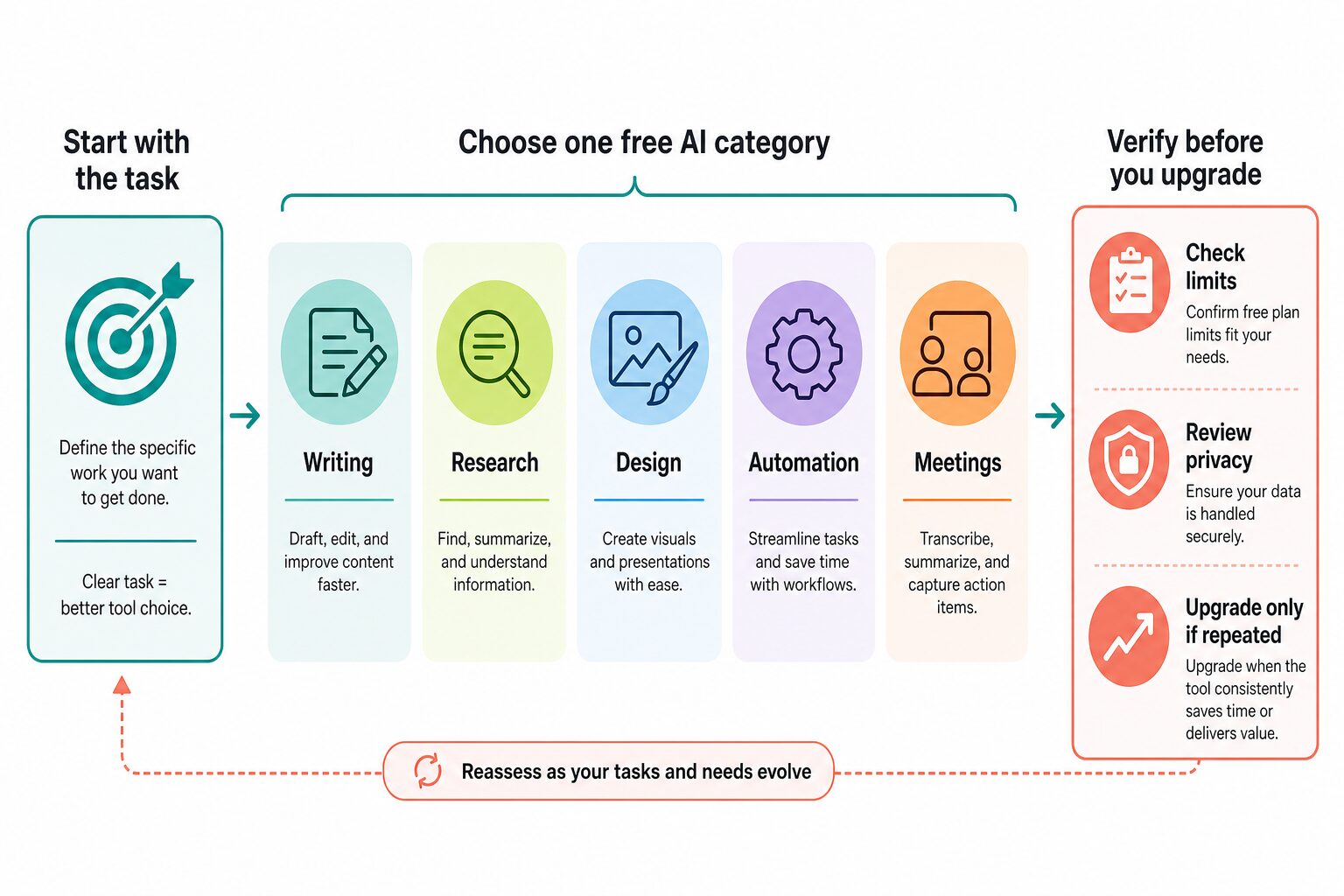
The safe order is simple: choose by task, test the free tier on a repeated workflow, check limits and privacy, then upgrade only when the tool consistently replaces real work. Do not upgrade because a listicle says a tool is powerful.
How We Selected These Free AI Tools
This article uses an official-research-only standard. That means product pages, pricing pages, help centers, and privacy or security pages were checked, but the tools were not ranked by hands-on output quality in this run.
The selection criteria were:
- Useful free access: the tool has an official free path, free individual plan, or no-cost starting point.
- Real work fit: the tool solves a common work task, not just a novelty prompt.
- Clear upgrade path: the reader can understand what might push them from free to paid.
- Privacy relevance: the tool may touch work data, uploaded files, connected apps, or meetings, so privacy checks matter.
- Stack balance: the list avoids eight tools that all do the same kind of chat drafting.
Free-plan limits change often. Treat every limit below as a check-before-signup item, especially if you use AI for client work, student records, legal or medical context, finance, HR, sales calls, or confidential workplace documents.
The Best Free AI Tools for Work
1. ChatGPT: Best General Starting Point for Drafting and Brainstorming
ChatGPT is the broadest first stop if you want one free AI assistant for drafting outlines, rephrasing rough text, brainstorming ideas, turning notes into structure, and asking follow-up questions. It is a good starter because you can use it across many work categories before deciding whether a specialized tool is worth adding.
The official ChatGPT pricing page lists a Free plan with limited access to messages, uploads, image generation, deep research, memory, context, and other features. OpenAI's ChatGPT Plus help page states that Plus is $20 per month and that usage limits may vary based on system conditions.
Use the free plan when: you need a flexible writing, planning, and ideation assistant for occasional work.
Skip or pause when: the task depends on private files, regulated data, or facts that must be verified from official sources. Use it to draft and structure, then check facts yourself.
2. Claude: Best Free Alternative for Long-Form Thinking and Work Drafts
Claude is another strong general assistant to try before paying for anything. Its official pricing page positions the Free plan for chat on web, mobile, and desktop, plus writing, editing, content creation, web search, memory, code/data work, connectors, and other capabilities.
The official Claude pricing page lists Free at $0, Pro at $17 per month with annual billing or $20 monthly, and Max from $100 per month. The same page notes that usage limits apply and that prices and plans can change at Anthropic's discretion.
Use the free plan when: you want another general AI assistant for drafting, editing, summarizing, planning, or comparing options.
Skip or pause when: you are trying to decide which model is objectively "best" without running your own examples. This article does not make output-quality claims.
3. Gemini: Best if Your Work Already Lives in Google
Gemini is the most natural free tool to check if you already work inside Google accounts, Gmail, Docs, Sheets, Drive, YouTube, and Search. The value is not only chat. It is the possibility of getting AI assistance near the Google tools where many people already work.
Google's Gemini Apps help page says some features can be used without signing in, while additional features and saved activity require signing in with a Google Account. Google's Google AI Plans page describes paid plans that add higher Gemini usage limits and broader Google AI features. Because plan names, limits, and regional availability change, check the official page before paying.
Use the free path when: your work already starts in Google and you want a quick assistant for planning, summarizing, drafting, or exploring ideas.
Skip or pause when: your workplace has strict Google account, activity history, or data-use rules. Check admin settings and Gemini Apps privacy settings before using work content.
4. NotebookLM: Best Free Tool for Source-Based Research and PDFs
NotebookLM is the tool to try when the problem is not "write me something from scratch" but "help me understand these sources." It fits students, researchers, analysts, and knowledge workers who have PDFs, notes, transcripts, reports, or web sources they need to organize and question.
Google's NotebookLM FAQ says the current limit is 500,000 words per source or up to 200MB for local uploads. Google's NotebookLM upgrade help page says higher limits and additional features are available through Google AI Plans, Google Cloud, or qualifying Google Workspace plans.
Use the free plan when: you need to ask questions across your own source material, prepare study notes, summarize reports, or work from uploaded documents.
Skip or pause when: the source material is confidential, restricted by school/work policy, or too sensitive for upload. Also avoid treating NotebookLM as a general search ranking tool; it is strongest when your sources are the main evidence.
For document-heavy work, compare our guide to AI PDF summarizers for students and professionals.
5. Grammarly: Best Free Tool for Final Writing Polish
Grammarly is the best fit when you already have a draft and need a cleaner final pass. That makes it different from a blank chat assistant. It is especially useful for emails, short workplace messages, resumes, LinkedIn copy, proposals, and public-facing writing where grammar, tone, and clarity matter.
The official Grammarly plans page says the Free plan includes writing without spelling and grammar mistakes, tone visibility, and 100 AI prompts per month. The same page lists Pro features such as full-sentence rewrites, tone adjustments, English fluency support, plagiarism and AI-generated text detection, and 2,000 AI prompts per member per month. Grammarly's security page describes SOC 2 Type 2 and enterprise controls.
Use the free plan when: your main problem is polishing messages you already wrote.
Skip or pause when: you need research, design, workflow automation, or a full document workspace. Grammarly is a writing layer, not the whole stack.
If writing is the main pain point, read our practical workflow for how to rewrite professional emails with AI without losing your meaning.
6. Canva: Best Free Tool for Simple Work Visuals
Canva belongs in a free work stack because many people do not just need text. They need slides, one-pagers, social posts, flyers, simple thumbnails, worksheets, and quick visuals that can still be edited afterward.
Canva's official Canva AI page describes AI-assisted design, writing, and creative workflows. The official Canva pricing page did not render full pricing details in this browser session, so this article does not quote current Canva Pro, Business, or Teams prices. Check Canva's own pricing page before upgrading.
Use the free plan when: you need practical visuals and editable design assets for everyday work.
Skip or pause when: you only need text drafting, source research, or strict brand governance. Also avoid using fake dashboards, fake customer quotes, or misleading visuals just because AI can generate them.
7. Zapier: Best Free Tool for Simple Two-Step Automation
Zapier is useful when the task is not creative work but repeat handoffs: form submissions to a spreadsheet, new leads to a CRM, calendar events to task lists, or notifications when something changes. It is not where beginners should start if the workflow changes every day.
The official Zapier pricing page lists a Free plan at $0 per month with 100 tasks per month. It says the Free plan includes Zaps, Tables, Forms, two-step Zaps, and Zapier Copilot with daily message limits. The same page lists Professional from $19.99 per month billed annually for multi-step Zaps and more advanced features.
Use the free plan when: the process has one clear trigger and one clear action.
Skip or pause when: the workflow is not stable, the connected apps hold sensitive data, or nobody will monitor failures and duplicates. Automating a messy process usually creates a faster mess.
8. Fathom: Best Free Tool to Try for Meeting Notes
Fathom is worth checking if meetings create a large part of your work: sales calls, client check-ins, team updates, interviews, or recurring planning meetings. The benefit is not just transcription. It is having a searchable record and summary that can reduce manual note cleanup.
The official Fathom pricing page lists a Free individual plan at $0 and says it includes unlimited recordings and transcriptions, instant AI call summaries, clips, playlists, and search across calls. Fathom's privacy policy describes collection of meeting recordings, transcripts, meeting content, attendee information, and connected calendar/application data, so consent and workplace policy review are essential.
Use the free plan when: you have recurring meetings where notes and follow-ups matter, and everyone is comfortable with recording or transcription.
Skip or pause when: the meeting includes sensitive client, medical, legal, financial, HR, school, or confidential internal information and your organization has not approved the tool.
For broader meeting-tool comparisons, see our AI meeting assistants guide.
A Practical Free AI Stack for Work
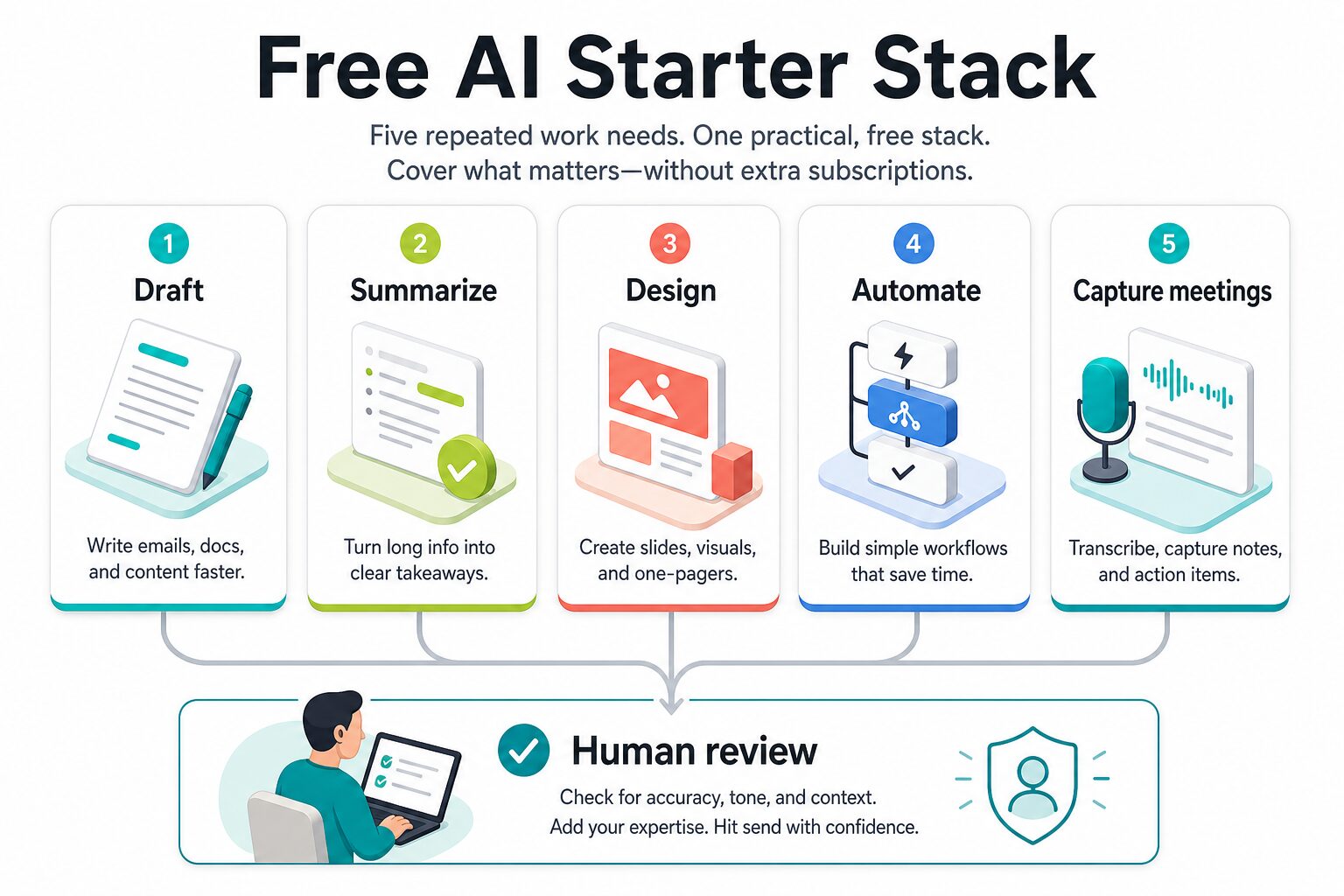
A small free stack is better than a giant account collection. Most readers should start with this structure:
- Draft: ChatGPT, Claude, or Gemini for rough thinking, outlines, emails, and planning.
- Summarize sources: NotebookLM when the answer should come from your uploaded material.
- Polish: Grammarly for final grammar, tone, and clarity checks.
- Design: Canva for simple visuals, slides, and social assets.
- Automate or capture meetings: Zapier for stable two-step handoffs, or Fathom when meeting notes are the repeated problem.
The stack should stay small until you know what each tool replaces. If you cannot name the task, the frequency, the input, the output, and the review step, do not add another tool yet.
Privacy Checks Before You Use Free AI Tools for Work
Free tools are often enough for everyday work, but free does not mean risk-free. Before pasting, uploading, connecting, or recording anything, check the exact plan and account settings.
- Chat prompts: remove names, confidential details, account numbers, private student/client facts, and anything your workplace would not want in a third-party tool.
- Uploaded files: check whether the tool stores files, uses them for model improvement, or keeps them inside a workspace with admin controls.
- Connected apps: review Gmail, Outlook, Drive, Calendar, Slack, CRM, and meeting permissions before authorizing an automation or meeting tool.
- Meetings: get the right consent before recording or transcribing. Some calls should not use a free AI notetaker at all.
- Human review: AI drafts should be checked for names, dates, numbers, links, claims, tone, and context before sending.
For work use, the question is not only "is this vendor secure?" It is also "should this specific information go into this specific free account for this specific task?"
When the Free Plan Is Enough
The free plan is usually enough when the task is occasional, low-risk, and easy to review. Examples include brainstorming blog outlines, rewriting a non-confidential email draft, summarizing public research, making a basic social graphic, or testing a simple two-step automation with sample data.
The free plan is not enough when limits interrupt repeated work, when collaboration matters, when admin controls are required, or when the tool touches sensitive business data. In those cases, the right next step may be a paid team plan, an approved enterprise account, or no AI tool at all.
FAQ
What is the best free AI tool for work overall?
For most people, start with ChatGPT, Claude, or Gemini as a general assistant, then add a specialized tool only when a repeated task demands it. If the task is source-based reading, NotebookLM may be the better first pick.
Can I use free AI tools for client work?
Only after checking your client agreement, workplace policy, data sensitivity, and the tool's official privacy terms. For confidential client work, avoid uploading raw files or identifiable details unless the account and terms are appropriate.
Should I pay for one AI tool instead of using several free tools?
Pay only after a free tool proves repeat value. A paid plan makes sense when it removes a real limit, adds needed privacy/admin controls, or supports a workflow you use every week.
Are free AI tools good enough for professional writing?
They can help with drafting, structure, and polish, but they do not replace judgment. For important messages, use AI as a second pass and review meaning, tone, facts, names, dates, and claims yourself.
Final Recommendation
Build your free AI stack from the task backward. If you need a general assistant, try ChatGPT, Claude, or Gemini. If you need source-grounded document work, try NotebookLM. If you need final writing polish, add Grammarly. If you need visuals, use Canva. If the repeated problem is app handoffs or meeting notes, check Zapier or Fathom only after reviewing privacy and consent.
The best free AI tools for work are the ones you can use deliberately, review safely, and stop using when they do not help. Start small, verify official limits, protect sensitive data, and upgrade only when a repeated workflow proves the value.