ChatGPT vs Claude for Business Writing
Compare ChatGPT vs Claude for business writing by workflow fit, pricing checks, privacy cautions, and team use rules.
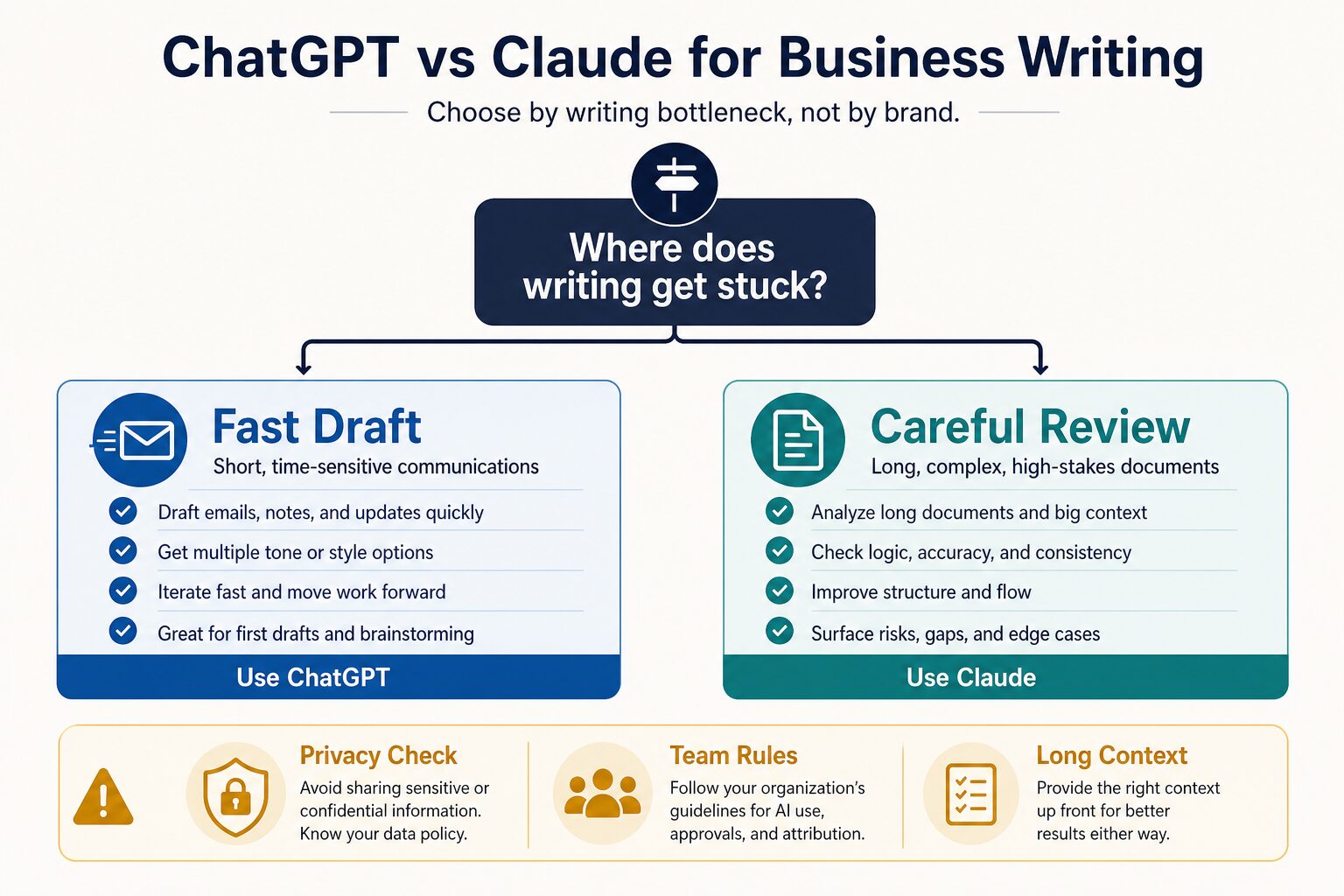
If you are choosing between ChatGPT and Claude for business writing, start with the writing bottleneck. Choose ChatGPT first when you need fast business drafts, email variants, brainstormed angles, and quick iteration. Choose Claude first when you need careful review of longer material, nuanced tone work, structured critique, and stronger long-context thinking.
Quick verdict: choose by the writing bottleneck
- Choose ChatGPT first if your work is mostly fast emails, internal updates, outlines, message variants, meeting follow-ups, and “turn these notes into a clean draft” tasks.
- Choose Claude first if your work is mostly long documents, careful rewrites, proposal review, executive summaries, tone-sensitive edits, and finding gaps in a messy draft.
- Pause before using either with work data if your team has not reviewed account type, model-training settings, retention, file access, confidentiality rules, and approval policy.
Evidence note: This article is based on official product, pricing, business-data, privacy, and terms pages checked on June 27, 2026. It is official-source-only, not a hands-on output-quality benchmark.
The real question is not which model wins
Most ChatGPT vs Claude comparisons try to name a universal winner. That is not how business writing works. A manager writing a quick client reply has a different problem from a consultant reviewing a 12-page proposal. A non-native English professional polishing a polite email has a different risk from a team lead summarizing confidential internal notes.
For AI Work Toolkit, the safer comparison is workflow fit. Ask where the writing gets stuck: speed, structure, tone, context length, privacy, or team approval. The answer will usually tell you which tool to try first.
ChatGPT vs Claude for business writing: side-by-side
| Decision point | ChatGPT | Claude | Practical business writing choice |
|---|---|---|---|
| Best first fit | Fast drafting, email variants, outlines, brainstorming, rewrites, and broad assistant work across many small writing tasks. | Longer documents, careful review, nuanced tone edits, structured critique, and context-heavy business writing. | Start where your weekly writing friction is highest, not where a demo looks most impressive. |
| Evidence status | Official-source-only for this article. No output-quality test is claimed. | Official-source-only for this article. No output-quality test is claimed. | Use this as a decision framework, then test one real non-sensitive task yourself. |
| Pricing check | OpenAI’s official pricing page lists Free and paid ChatGPT tiers. Check the live page or checkout for current regional price, usage limits, and business-plan terms. | Claude’s official pricing page lists Free and paid individual/team tiers. Check the live page or checkout for current regional price, usage limits, and team terms. | Avoid annual or team commitments until the tool has helped with repeated weekly writing tasks. |
| Fast business drafts | Stronger first trial when you want quick versions of emails, updates, talking points, and short drafts. | Still useful, but its advantage is clearer when the draft needs more context, judgment, or careful revision. | Use ChatGPT first for speed and iteration. |
| Careful document review | Useful for summary, restructuring, and rewrite options when the material is manageable. | Stronger first trial when the task involves long context, consistency checks, careful tone, and finding missing risks. | Use Claude first for long or sensitive review work. |
| Privacy and workplace data | OpenAI publishes business-data commitments and data-control documentation, but consumer and business account settings are not the same. | Anthropic publishes consumer model-training guidance and separate commercial terms, but account type and settings still matter. | Do not paste sensitive work material until your organization has approved the tool, account type, and data handling. |
Use ChatGPT first for fast drafts and everyday business writing
ChatGPT is the cleaner first trial when your writing problem is speed and iteration. That includes turning bullet points into a client email, drafting a meeting follow-up, creating three versions of a status update, making a message more concise, or turning rough notes into a first-pass outline.
The practical advantage is breadth. ChatGPT works well as a general writing partner when you want to move from blank page to useful draft quickly. It is also a good fit when you want multiple angles before choosing the final wording.
Short business drafts, emails, update messages, outlines, brainstorming, tone variants, and quick rewrites.
Your main task is reviewing a long document, checking consistency across many sections, or working with confidential company material without an approved business account.
If your main need is a broader AI writing shortlist, start with our guide to best AI writing tools for work. If your problem is specifically email tone, use our workflow for rewriting professional emails with AI without sounding generic.
Use Claude first for careful review and long-context writing
Claude is the cleaner first trial when your writing problem is not the blank page. It is the long document, the subtle tone issue, the messy proposal, the dense memo, or the draft that needs a second brain to find gaps and improve flow.
That makes Claude especially interesting for business writing tasks where “make it shorter” is not enough. You may want it to identify missing assumptions, spot a weak argument, turn a long document into an executive summary, or rewrite a proposal section without losing nuance.
Longer drafts, careful review, tone-sensitive edits, structured critique, executive summaries, and consistency checks.
Your main work is short daily messages and you need the fastest path to first drafts more than long-context review.
Use this five-minute business writing test
Before paying for either tool, run one safe, non-confidential writing task. Do not use private client, customer, employee, legal, medical, financial, or student data. Replace names, numbers, company details, and sensitive facts with placeholders.
- Pick one recurring task: a client reply, weekly update, proposal paragraph, executive summary, or meeting follow-up.
- Write the same instruction for both tools: include audience, goal, tone, length, and what must not change.
- Check meaning preservation: reject any version that changes facts, promises, deadlines, scope, or responsibility.
- Check edit friction: ask which output needs fewer human edits before it is safe to send.
- Check privacy fit: confirm whether your account type and settings are acceptable for this work before repeating the workflow.
This is not a lab benchmark. It is a practical fit test. The winner is the tool that helps your real writing task with the least cleanup and the least risk.
Pricing and plan checks before you pay
Both products have free entry points and paid tiers, but plan names, limits, features, and regional checkout details can change. For this reason, the safest pricing advice is not “buy the plan with the biggest feature list.” It is to verify the official pricing page on the day you pay and connect the plan to a repeated writing workflow.
Before upgrading: check current monthly and annual pricing, message or usage limits, file or long-context limits, team-seat requirements, admin controls, data handling, and whether the features you want are available in your country and account type.
If you are choosing among paid general AI assistants, compare this page with our broader ChatGPT Plus vs Claude Pro vs Gemini Advanced guide.
Privacy checks before using either tool for work
Business writing often contains more sensitive information than it looks like: client names, contract terms, HR issues, sales numbers, product plans, customer complaints, legal facts, or internal strategy. Do not paste that material into a consumer AI account just because the writing task feels simple.
OpenAI publishes separate business-data commitments and data-control documentation. Anthropic publishes consumer model-training guidance and separate commercial terms. Those sources are useful, but they do not replace your organization policy. Account type, settings, admin controls, retention, connectors, file uploads, and team rules all matter.
- Use placeholders first: replace names, company details, numbers, and private facts before testing.
- Separate consumer and work use: a personal account is not the same as an approved business or team plan.
- Check model-training settings: confirm whether your prompts and outputs can be used to improve models.
- Review connector and file behavior: uploaded documents and connected apps can expose more context than pasted text.
- Keep human accountability: do not let either tool finalize legal, HR, finance, medical, academic, or client-sensitive messages without review.
Use our AI tool privacy checklist for professionals before connecting either assistant to sensitive work.
Scenario-based recommendation
| Your business writing task | Try first | Why | Caution |
|---|---|---|---|
| Write a quick client reply from bullet points | ChatGPT | Fast iteration and multiple message versions are the main advantage. | Check the final version for accidental promises or tone changes. |
| Review a proposal or long memo | Claude | Long-context review and structured critique are usually the better first fit. | Remove sensitive client or company details unless the account is approved. |
| Rewrite an email without sounding generic | ChatGPT, then compare Claude if nuance matters | ChatGPT is fast for variants; Claude can be useful when tone is subtle. | Tell the tool what meaning must stay unchanged. |
| Summarize a long internal document for leadership | Claude | The task depends on context, structure, caveats, and missing risks. | Use approved account rules; do not upload confidential files casually. |
| Create campaign ideas, outlines, and first drafts | ChatGPT | Breadth and fast brainstorming matter more than careful long-document review. | Do not publish generic AI copy without human editing and source checks. |
Frequently asked questions
Is ChatGPT better than Claude for business writing?
ChatGPT is usually the better first test for fast drafts, email variants, outlines, and broad everyday business writing. Claude is usually the better first test for long documents, careful review, nuanced tone edits, and context-heavy critique. The better choice depends on the writing bottleneck.
Is Claude better for long documents?
Claude is often the cleaner first trial when the task depends on long context, consistency, tone, and careful review. That does not mean it is automatically better for every business-writing task. For short messages and fast iterations, ChatGPT may be more practical.
Can I use ChatGPT or Claude for confidential work writing?
Only after your organization approves the tool, account type, settings, and data handling. For testing, use placeholders and non-sensitive examples. Review official privacy, data-use, retention, and commercial terms before uploading real workplace material.
Should a team buy both ChatGPT and Claude?
Most teams should avoid buying both until there is a clear workflow split. ChatGPT may cover fast drafting and general assistant work, while Claude may cover longer review and careful document workflows. Buy both only if each solves a repeated weekly problem.
What should non-native English professionals try first?
Start with the task. If you need quick email rewrites and tone options, try ChatGPT first. If you need careful review of a longer draft while preserving meaning, try Claude first. In either case, ask the tool to keep your meaning intact, not to erase your voice.
Final recommendation
For most individual professionals, start with ChatGPT if the work is fast, short, and iterative. Start with Claude if the work is longer, more nuanced, and needs careful review. For teams, the first decision is not model preference. It is whether the account type, data handling, admin rules, and privacy settings are acceptable for workplace writing.
The safest next step is simple: pick one non-sensitive business writing task, run the same prompt in the tool that best matches your bottleneck, check the output for meaning and risk, then upgrade only if that workflow repeats every week.
Sources checked
- OpenAI: ChatGPT pricing, ChatGPT product page, business data privacy, and Data Controls FAQ.
- Anthropic: Claude pricing, Claude product page, model-training privacy guidance, and commercial terms.