Wix vs Squarespace AI Website Builders
Compare Wix vs Squarespace AI Website Builders with pricing checks, privacy cautions, and clear guidance on who should use or skip each tool.
Quick verdict
Choose Wix AI first if you want the fastest path from prompt to a business site with built-in tools for bookings, ecommerce, forms, contacts, marketing, SEO, and day-to-day operations. Choose Squarespace Blueprint AI first if your priority is a polished brand site, portfolio, creator storefront, or service page where design consistency matters more than operational complexity.
Pause before paying if you have not confirmed the exact plan that unlocks your domain, store, scheduling, payment, video, contributors, analytics, or privacy needs. Both can help you draft a site; neither removes the need to review copy, plan limits, forms, cookie settings, and customer-data handling.
Evidence status: this comparison is based on official product, pricing, support, privacy, and AI policy pages checked on July 10, 2026. It is not a hands-on benchmark of AI design quality, SEO results, support speed, store conversion, or generated copy quality.
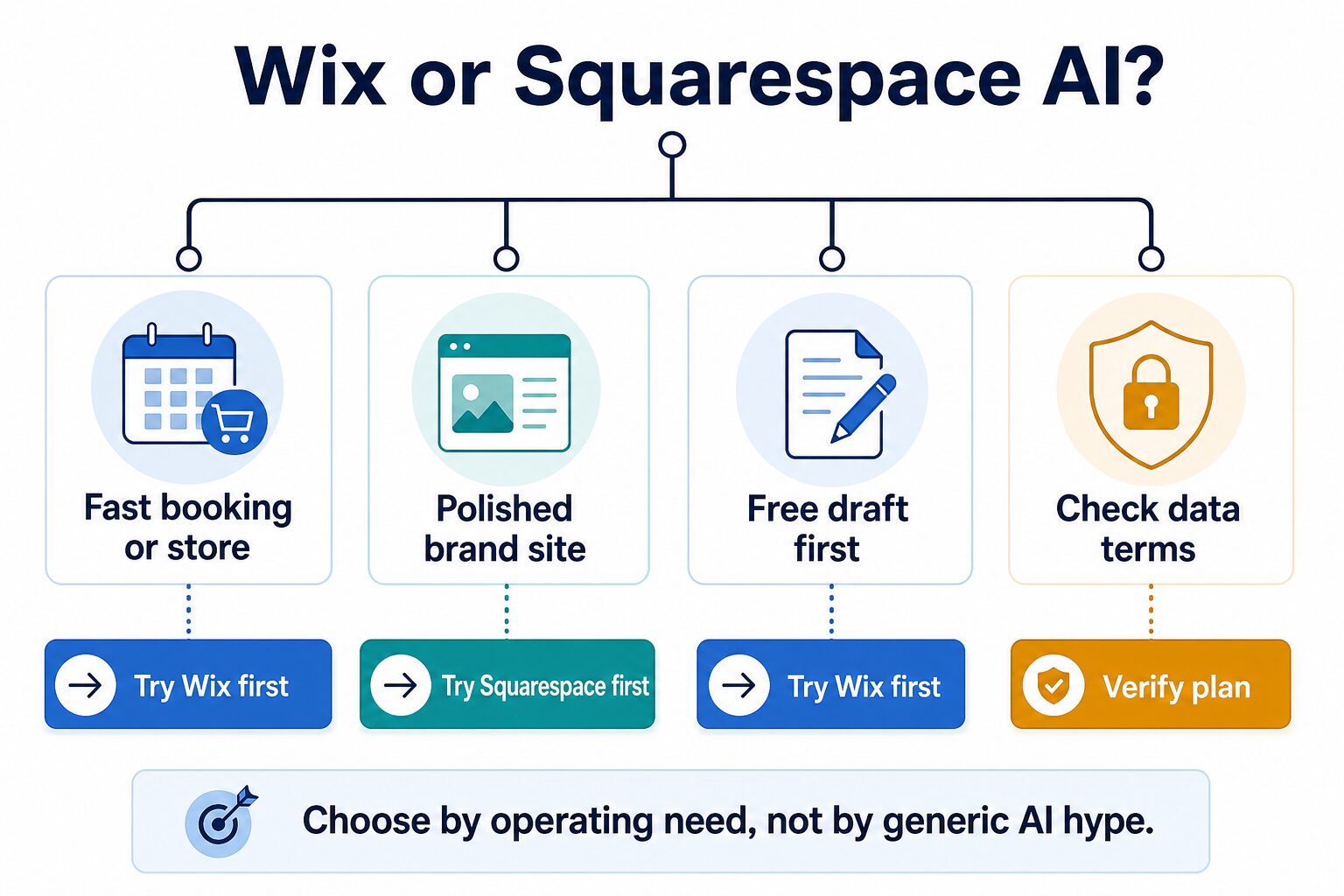
How to choose between Wix AI and Squarespace Blueprint AI
The wrong question is, “Which AI website builder is better?” The useful question is, “Which one handles the job my site needs to do next month?” A restaurant, coach, photographer, course creator, local service business, and solo consultant can all need different things from the same website-builder category.
Use these four checks before you compare templates or AI-generated copy.
Do you need booking, store, checkout, forms, contacts, and marketing in one hosted system?
Do you need a clean portfolio, service page, media kit, or elegant brand site more than a complex backend?
Which paid plan actually unlocks the domain, sales, scheduling, storage, contributors, or analytics you need?
What will visitors submit through forms, booking, payment, analytics, cookies, and AI-generated content?
If you are still choosing the broader category, start with our AI website builders for solo businesses. Before paying, use the AI website builder checklist. If your question is really WordPress control versus hosted speed, read WordPress vs AI website builders for small teams and WordPress vs Wix AI for small business sites.
Wix vs Squarespace AI: comparison table
| Decision point | Wix AI Website Builder | Squarespace Blueprint AI | Practical takeaway |
|---|---|---|---|
| Best first fit | Solo operators who want a quick AI-generated start plus a hosted business toolkit for appointments, ecommerce, forms, marketing, SEO, contacts, and analytics. | Creators, small brands, portfolio owners, and service businesses that want a guided brand-site starting point with polished layouts and controlled design choices. | Pick by the site job: operations-heavy sites lean Wix first; presentation-led sites lean Squarespace first. |
| AI builder role | Wix says its AI builder creates a business-ready website from a description and lets users edit with Wix tools, including Aria and drag-and-drop editing. | Squarespace describes Blueprint AI as a guided AI website builder within its Design Intelligence system, producing a personalized starting point from business and brand inputs. | Treat both as first-draft systems. Review copy, page structure, contact paths, policies, and conversion flow before launch. |
| Free or trial path | Wix’s official AI builder page says users can create a website for free. Paid upgrades are still needed for many launch and business features. | Squarespace generally routes new users through an account/trial experience and paid plans for live business use. Confirm current trial terms on the official flow. | Wix is easier to try as a free draft path. Squarespace is still low-friction to inspect, but plan timing matters. |
| Pricing check | Wix pricing is dynamic by country, tax, promotion, and billing period. Check the official plan page for the tier that includes domain, ecommerce, scheduling, storage, marketing, and collaborators. | Squarespace pricing uses plan tiers such as Basic, Core, Plus, and Advanced. Support pages explain commerce transaction fees, payment fees, video storage, and plan-specific selling features. | Do not compare only the lowest visible monthly price. Compare the plan that unlocks your required workflow. |
| Bookings, store, and operations | Wix is the stronger first check when the site needs built-in booking, ecommerce, payments, service tools, marketing, customer contacts, or a more operational dashboard. | Squarespace can support commerce and services, but its advantage is usually strongest when the storefront or service page also needs a polished, cohesive brand presence. | For a booking/store launch, list the required actions first, then verify the exact plan and fees. |
| Design and brand feel | Wix gives more business-tool breadth and flexible editing, which can be helpful but may require more restraint to keep the site clean. | Squarespace’s guided design system is a better first check when you want a controlled, editorial-looking site without designing every element from scratch. | Choose Squarespace first if “looks premium quickly” matters more than maximum operational breadth. |
| Privacy and AI caution | Wix publishes privacy, Privacy Center, and generative AI policy resources. Site owners still need to handle visitor privacy, cookies, forms, and customer-data choices responsibly. | Squarespace publishes privacy, AI, and sample privacy-policy resources. Site owners still need a real privacy policy and cookie/data choices that match their business. | Do not paste confidential client details into prompts. Do not launch forms, bookings, analytics, or payments without a privacy review. |
| Who should skip | Skip Wix first if you mainly need a quiet portfolio or brand site and do not want a broader business-tool dashboard. | Skip Squarespace first if your launch depends on many operational tools, complex booking/store flows, or a highly specific business backend. | Neither is automatically best. The right first try is the one with the fewest plan surprises for your real site job. |
When Wix AI is the better first try
Try Wix AI first if the website is part of your operating system. A local service business, coach, tutor, small shop, event provider, or appointment-based business may need the website to handle more than a homepage.
Wix is the more practical first check when the launch checklist includes scheduling, payments, customer contacts, forms, email marketing, ecommerce, service pages, SEO setup, analytics, or a simple way to update business content without assembling multiple external tools.
The tradeoff is that more tools also mean more plan gates. Before upgrading, confirm the exact plan that supports your store, bookings, collaborators, storage, domain, marketing features, and any payment or transaction requirements. If your business only needs a quiet brand site, Wix may feel heavier than necessary.
When Squarespace Blueprint AI is the better first try
Try Squarespace Blueprint AI first if brand presentation is the main job. A photographer, designer, writer, creator, consultant, small studio, or service business may need a cohesive site that feels credible before it needs complex operations.
Squarespace is the better first check when you care about structured design choices, a polished visual system, portfolio pages, brand consistency, a premium service presence, or a creator storefront where the layout should feel calm and intentional.
The tradeoff is plan fit. Check the official pricing and support pages for the plan that matches your commerce, digital product, video, payment-fee, and customer-support needs. If the site needs heavy booking/store operations right away, compare Squarespace’s plan details against Wix before choosing by design feel alone.
A 20-minute pre-payment test
You do not need a full build to make a safer first decision. Run this quick test before committing to a paid plan.
| Minute | What to check | Pass condition |
|---|---|---|
| 0-5 | Describe the business, audience, pages, offer, tone, and required actions in plain English. | The AI draft gives you a usable structure without inventing services, guarantees, or claims you cannot stand behind. |
| 5-10 | Open the plan page and support docs for the exact required actions: domain, store, booking, forms, analytics, contributors, and storage. | You can identify the minimum plan and likely recurring cost before adding content. |
| 10-15 | Review privacy pages, AI policy/help docs, cookie/banner options, and sample privacy-policy guidance. | You know what visitor data the site may collect and what policy work is still yours. |
| 15-20 | Inspect the first draft like a customer: contact path, booking/store path, trust signals, copy accuracy, mobile readability, and next step. | The site can become launch-ready with edits, not a complete rebuild. |
Privacy and AI-generated copy checks
The AI builder can help you start faster, but your business is still responsible for what the website says and collects. Avoid putting private client details, student records, medical or legal facts, unreleased business plans, payment data, or sensitive customer information into prompts.
Before launch, check any contact form, booking flow, store checkout, analytics tool, email signup, cookie banner, and privacy policy. If your work handles confidential information, use our AI tool privacy checklist for professionals before publishing forms or prompts that include real user data.
Final recommendation
Use Wix AI first if the website needs to operate the business: booking, ecommerce, payments, customer contacts, marketing, and a managed dashboard. Use Squarespace Blueprint AI first if the website needs to present the business beautifully and consistently: portfolio, service brand, creator storefront, or polished landing site.
For either platform, do not pay until the plan gate is clear. Your checklist is simple: required website job, exact plan, data policy, launch path, and what you will do if the AI draft looks good but the business flow is incomplete.
Official sources checked
Official research checked July 10, 2026: Wix AI Website Builder, Wix pricing, Wix premium-plan help, Wix AI-generated site help, Wix privacy policy, Wix Privacy Center, Wix Generative AI Policy, Squarespace AI Website Builder, Squarespace Design Intelligence, Squarespace Blueprint AI overview, Squarespace pricing, Squarespace plan help, Using Squarespace AI, Squarespace privacy policy, and Squarespace sample privacy-policy messages.