AI Tool Privacy Checklist for Client Websites
Before you use AI on a client website, decide what should never be uploaded. The risky part is often not the AI tool by itself; it is the path client and visitor data takes through copy drafts, forms, analytics events, image prompts, plugins, website builders, and handoff notes.
This AI privacy checklist for client websites is for freelancers, small agencies, and business owners who need a practical pre-launch rule: use AI for generic and anonymized work, ask before client-specific work, and keep personal, regulated, login, payment, and confidential data out unless the client and vendor terms clearly support that workflow. It is based on official vendor documentation refreshed on July 3, 2026. It is not legal advice or a hands-on security audit.
Quick Verdict
Use AI for public, generic, and anonymized website work. Ask first when the prompt includes client strategy, customer messages, analytics exports, unpublished brand assets, or anything covered by a client agreement. Do not casually upload form submissions, login details, payment information, health/legal/financial data, or real customer identifiers.
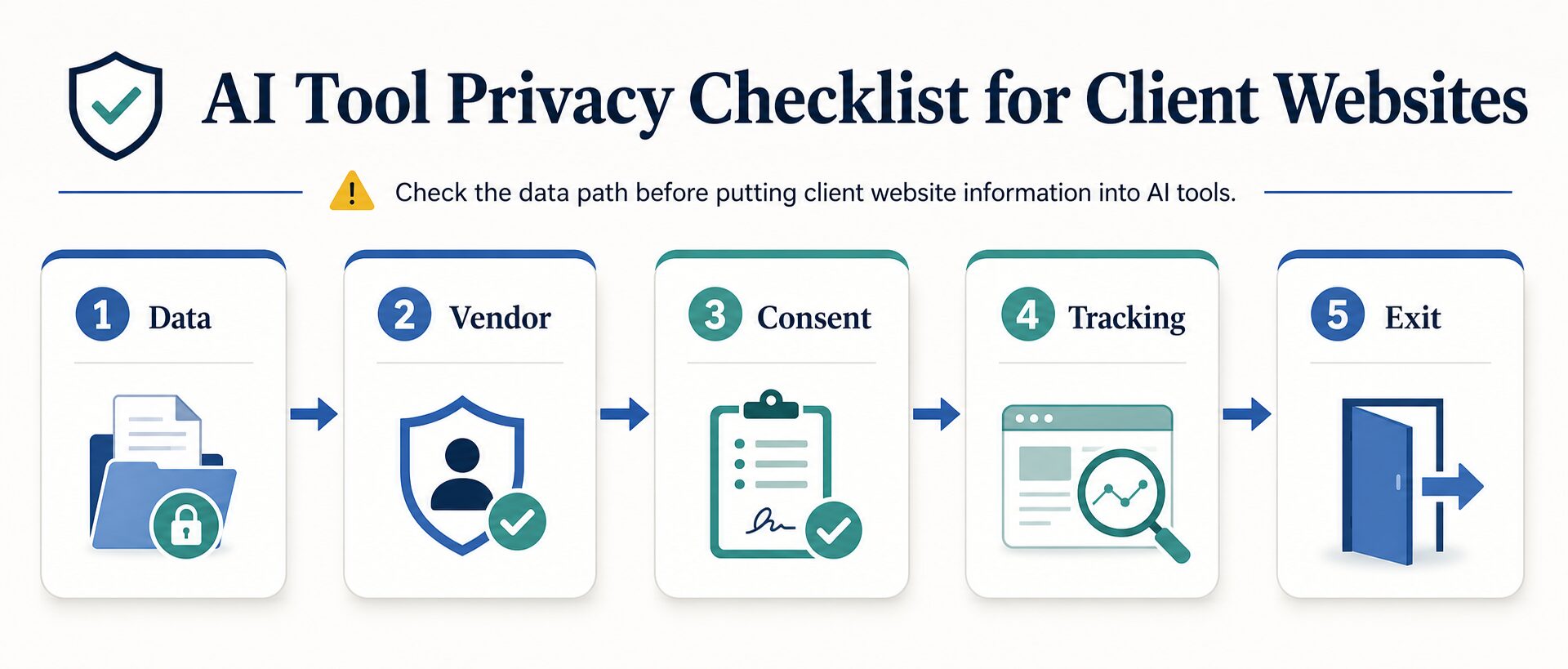
Before a client site goes live, check five things: the data, the vendor terms, client consent, tracking/form behavior, and the exit plan. If any one is unclear, use placeholders, redact the details, or get written approval before sending information to an AI tool.
- What this helps you decide: use a yes / ask first / do not upload rule for copy, builders, forms, analytics, and handoff files.
- Trust boundary: this is an operating checklist, not a legal opinion, compliance certification, or security audit.
For broader tool selection, pair this checklist with our best AI website builders for solo businesses, AI website builder checklist, and the broader AI tool privacy checklist before uploading work data.
Use This First: Yes, Ask First, Or Do Not Upload
If you only have two minutes, sort the input before you pick the tool. This table is the fastest way to prevent the most common client-website privacy mistakes.
| Website task | Usually OK for AI | Ask the client first | Do not upload casually |
|---|---|---|---|
| Homepage or service copy | Generic service descriptions, public offers, placeholder examples | Unpublished positioning, launch plans, private pricing notes | Contract terms, confidential strategy, private customer stories |
| Website builder AI | Public business description, generic sitemap, non-sensitive layout ideas | Client brand assets, unreleased offers, internal business logic | Account credentials, DNS details, payment setup, private files |
| Contact forms and lead capture | Blank fields, fake sample responses, generic error-message drafts | Anonymized themes from real inquiries after identifiers are removed | Names, emails, phone numbers, addresses, payment details, health/legal/financial data |
| Analytics and tracking | Aggregate trends with no identifiers | Page paths, search terms, campaign names, or event names that may reveal people or clients | Emails, full names, usernames, precise locations, phone numbers, or identifiers in URLs/events |
The Five-Step AI Privacy Checklist
1. Classify The Website Data First
Do not start by asking, “Is this AI tool safe?” Start by asking, “What data am I about to give it?” The same AI copy tool can be low risk for a generic homepage draft and high risk for a prompt containing client revenue, customer emails, private testimonials, unreleased product details, or form submissions.
The practical rule is to classify the input before the tool sees it. If the input contains a person, a secret, a regulated topic, a credential, or a private business decision, treat it as a red flag until you have written client approval and vendor terms that fit the use case.
| Input type | Usually safer | Needs caution | Usually keep out of public AI tools |
|---|---|---|---|
| Website copy | Generic service descriptions, public offers, anonymized examples | Unpublished positioning, pricing drafts, launch plans | Confidential strategy, private customer stories, contract terms |
| Forms and leads | Blank form fields and sample fake responses | Aggregated themes after names and contact details are removed | Email addresses, phone numbers, addresses, payment details, health/legal/financial data |
| Analytics | High-level traffic trends with no identifiers | Exports with page paths, search terms, campaign names, or internal labels | Data that identifies, contacts, or precisely locates a person |
| Images and brand assets | Generic moodboard prompts and public brand guidelines | Client logos, unreleased designs, product mockups | Private customer photos, identity documents, confidential product images |
2. Check The Exact Vendor Terms, Not The Brand Name
A familiar brand name is not enough. You need the policy for the exact feature and account type you are using. Consumer chat, business workspace, API, website-builder AI assistant, image generator, analytics platform, and form tool can all have different data-use terms.
For example, OpenAI’s Data Controls FAQ explains controls for whether ChatGPT conversations help improve models, while OpenAI’s Enterprise Privacy page describes business-data treatment for business offerings. Those are not the same operational question as using an AI feature embedded inside a website builder.
Website builders also require separate checks. Wix tells site owners to explain what personal information they collect, how it is collected, how it is stored or shared, and how cookies or tracking tools are used. Squarespace tells users of Squarespace AI to review the terms and privacy policies of its AI software providers. Webflow’s AI terms say inputs and outputs are Customer Data under the agreement, while its AI Assistant help still recommends avoiding personal or sensitive data online whenever possible.
3. Get Client Consent Before AI Touches Client-Specific Material
If the work is generic, you may not need a formal approval trail. If the prompt includes the client’s business strategy, customers, unpublished content, proprietary data, analytics exports, or brand assets, get written approval or remove the details first.
A simple approval note can be enough for small projects:
- Which AI or website tool will be used?
- What type of data will be entered?
- Will names, emails, customer messages, analytics exports, or private files be excluded?
- Who reviews AI-generated copy, forms, pages, and images before launch?
- Where will the final privacy policy, cookie notice, or tracking disclosure live?
This matters because a platform privacy policy does not automatically create the client’s website privacy notice. Wix’s privacy-policy guidance says a website privacy policy should disclose how a site collects, uses, discloses, and manages visitor and customer data. Squarespace’s terms also point site owners toward their own responsibilities where applicable law requires a privacy policy.
4. Watch Forms, Analytics, URLs, And Event Names
Client website privacy problems often appear outside the AI prompt itself. A contact form, quiz, booking flow, analytics event, URL parameter, or plugin can move personal data into systems the client never reviewed.
Google Analytics documentation gives a useful hard line: Google interprets PII as information that could directly identify, contact, or precisely locate an individual, including examples such as email addresses, mailing addresses, phone numbers, precise locations, full names, and usernames. That means you should not send those details in page URLs, event names, form labels, custom dimensions, search terms, or campaign parameters.
Forms need the same care. Google’s Forms policies prohibit using the product for phishing, including collecting sensitive data such as passwords, financial details, and Social Security numbers. If a client needs sensitive intake, do not treat a generic form as automatically appropriate; check the vendor’s DPA, access controls, retention, and export/delete workflow first.
5. Build An Exit Plan Before Launch
The privacy question is not finished when the site goes live. Ask what happens when the client changes agencies, cancels a subscription, requests deletion, or moves the website.
| Tool category | What to verify before launch | Why it matters | Good fallback |
|---|---|---|---|
| AI website builder | Export options, domain control, AI terms, privacy policy support, data deletion | The client may need to move pages, forms, images, and domain settings later. | Keep a launch archive of page copy, image prompts, form fields, and DNS notes. |
| AI copy tool | Training controls, workspace settings, retention, data export, team access | Drafts can contain client positioning and customer context. | Use anonymized examples and keep final approved copy in the client’s own docs. |
| AI image tool | Input rights, output usage terms, brand asset rules, private image handling | Client logos, product shots, and customer images can carry rights and privacy risk. | Use generic prompts or client-approved brand assets only. |
| Analytics | PII restrictions, data retention, user deletion, data sharing, consent setup | Visitor behavior data can become sensitive when joined with identifiers. | Track aggregate behavior and avoid personal data in URLs/events. |
| Forms | DPA, subprocessors, encryption, access roles, sensitive-data restrictions, export/delete | Forms often collect the most direct personal data on a small website. | Collect the minimum needed and route sensitive intake to an approved system. |
Safe AI Use Examples For Client Website Work
AI can still be useful in a privacy-aware workflow. The point is not to avoid every tool. The point is to avoid giving the tool unnecessary client or visitor data.
Client Handoff Checklist
Before you hand over the site, leave a simple privacy trail. This helps the client maintain the website after you are gone.
- List every AI, builder, form, analytics, image, plugin, and automation tool used on the site.
- Save links to each vendor’s privacy policy, AI terms, DPA, subprocessor page, or retention controls when relevant.
- Document which tools received real client data and which used only generic or anonymized inputs.
- Confirm who owns the account, domain, analytics property, form responses, and exported site files.
- Give the client a deletion/export path for forms, media, AI drafts, and analytics settings.
- Point the client to the live privacy policy, cookie notice, and any consent settings that need legal review.
If monetized links are part of the site, use a separate trust checklist. Our guide to managing partner links in WordPress without losing trust covers disclosures, sponsored link tags, redirect hygiene, and review logs.
If the site is still choosing a platform, compare this handoff checklist with WordPress vs AI website builders for small teams. That decision affects export options, account ownership, plugin risk, form handling, and how easily a client can move later.
When To Use A Lawyer Or Security Specialist
Use this article as an operating checklist, not a legal substitute. Bring in qualified help when the client handles regulated health, financial, legal, child, education, employment, insurance, or government data; operates across multiple jurisdictions; runs paid ads with tracking pixels; collects sensitive form responses; or needs contractual privacy language.
The same caution applies when a client asks you to promise compliance. You can say which checks you performed and which vendor pages you reviewed. Do not promise that a site is legally compliant unless an appropriate professional has reviewed the actual project.
Official Sources Checked
The article uses official vendor documentation as source material, refreshed on July 3, 2026:
- OpenAI Data Controls FAQ and OpenAI Enterprise Privacy
- Wix privacy policy guidance and Wix Privacy Policy
- Squarespace AI guidance, Squarespace Privacy Policy, and Squarespace Terms of Service
- Webflow AI Terms, Webflow AI Assistant help, and Webflow Privacy Policy
- Google Analytics PII guidance, Google Analytics data retention, and Google Forms policies
- Typeform Data Processing Agreement
FAQ
Can I use AI to write client website copy?
Yes, when the prompt uses public, generic, anonymized, or client-approved material. Avoid putting confidential strategy, customer data, unpublished financials, private testimonials, or regulated information into a tool unless the client approved that workflow and the vendor terms fit the data.
Is a paid AI plan automatically safer than a free plan?
No. A paid plan may offer better controls, but you still need to check the exact plan, workspace settings, AI terms, retention rules, and admin controls. Do not assume price equals privacy.
Do I need a privacy policy on every client website?
That depends on the site’s data collection, audience, location, and applicable law. In practice, if the site uses forms, analytics, cookies, email marketing, payments, booking tools, or third-party scripts, the client should review the privacy notice before launch.
Can I paste Google Analytics exports into AI tools?
Only after checking that the export does not include identifiers or sensitive details. Be especially careful with page paths, search terms, event names, form fields, campaign names, and custom dimensions that might include names, email addresses, phone numbers, or other PII.
What is the safest default for a freelancer?
Use AI for generic drafts, structure, checklists, and anonymized examples. Keep real client files, form submissions, customer messages, and private analytics out of consumer AI tools unless the client and vendor terms clearly support that use.
Final Recommendation
For a client website, treat AI privacy as a workflow question: what data enters which tool, under which terms, with whose approval, and how can the client remove or replace it later?
Start with the five-step checklist: data, vendor, consent, tracking, and exit. If the input is generic, use AI. If it is client-specific, ask first. If it contains personal, regulated, login, payment, or confidential data, keep it out until the client, vendor terms, and legal/security review support that exact use.
Then use the related AI website builder checklist, WordPress vs AI website builders guide, and AI SEO writing tools guide when you are ready to choose specific tools for a small site.