Framer vs Webflow for Solo Businesses
Framer vs Webflow for a solo business: choose a visual landing page or a structured CMS workflow.
Quick verdict
Start with Framer when your first job is a visually led landing page, portfolio, or small marketing site and you want to evaluate a design-canvas workflow. Evaluate Webflow first when a structured content model, a growing CMS, or a deeper site workflow is already part of the plan.
Pause before choosing either if you cannot name the first visitor action. Draft one complete page and one future update before comparing every feature or paying for capacity you may not use.
Evidence boundary: This is an editorial comparison based on official plan, product, and privacy/security materials checked July 13, 2026. It is not a hands-on test of speed, support, SEO results, uptime, output quality, or conversion performance.
Choose by the first website job, not the longest feature list
For a solo business, the expensive mistake is usually not choosing the “wrong” brand. It is buying into a workflow before you know what the site must do in the next month. A consultant may need one credible services page and a contact route. A creator may need a portfolio and an email signup. A publisher may need repeatable article templates and a content model. Those are different jobs.
Framer and Webflow both present visual ways to build and publish sites, but their plan structures and working models deserve separate consideration. Framer’s official materials emphasize a visual canvas and tiers that include CMS, pages, editors, and content-editor limits. Webflow separates a Workspace, where sites are staged and collaborators work, from the Site plan used to publish, host, and unlock site features. That distinction matters if you are planning beyond a single page.
| Decision point | Framer | Webflow | What to verify before paying |
|---|---|---|---|
| Best first evaluation | A focused visual marketing site, portfolio, or launch page where layout and iteration are central. | A site where structured content, CMS operations, or a deeper publishing workflow is already a defined need. | Write one visitor action and one page you will update next month. |
| Plan model | Framer lists Free, Basic, Pro, and Enterprise; its FAQ says a custom domain requires a paid plan. | Webflow distinguishes a Workspace from a Site plan; its pricing page says new accounts receive a free Workspace and Starter Site plan. | Check the live price, billing cycle, tax, hosting/publishing needs, collaborator roles, and any limit that applies to your actual project. |
| Content decision | Evaluate the CMS, page, and editor limits against the size of the site you expect to maintain. | Evaluate whether the additional structure of a Workspace plus Site plan fits your content and collaboration plan. | Model one real article, case study, product, or collection before committing. |
| Privacy and lead data | Review current terms, security materials, and the data you plan to put into the service. | Review current privacy/DPA materials and the data path for forms, analytics, and connected services. | Confirm your privacy notice, consent path, access roles, and approval process before collecting personal data. |
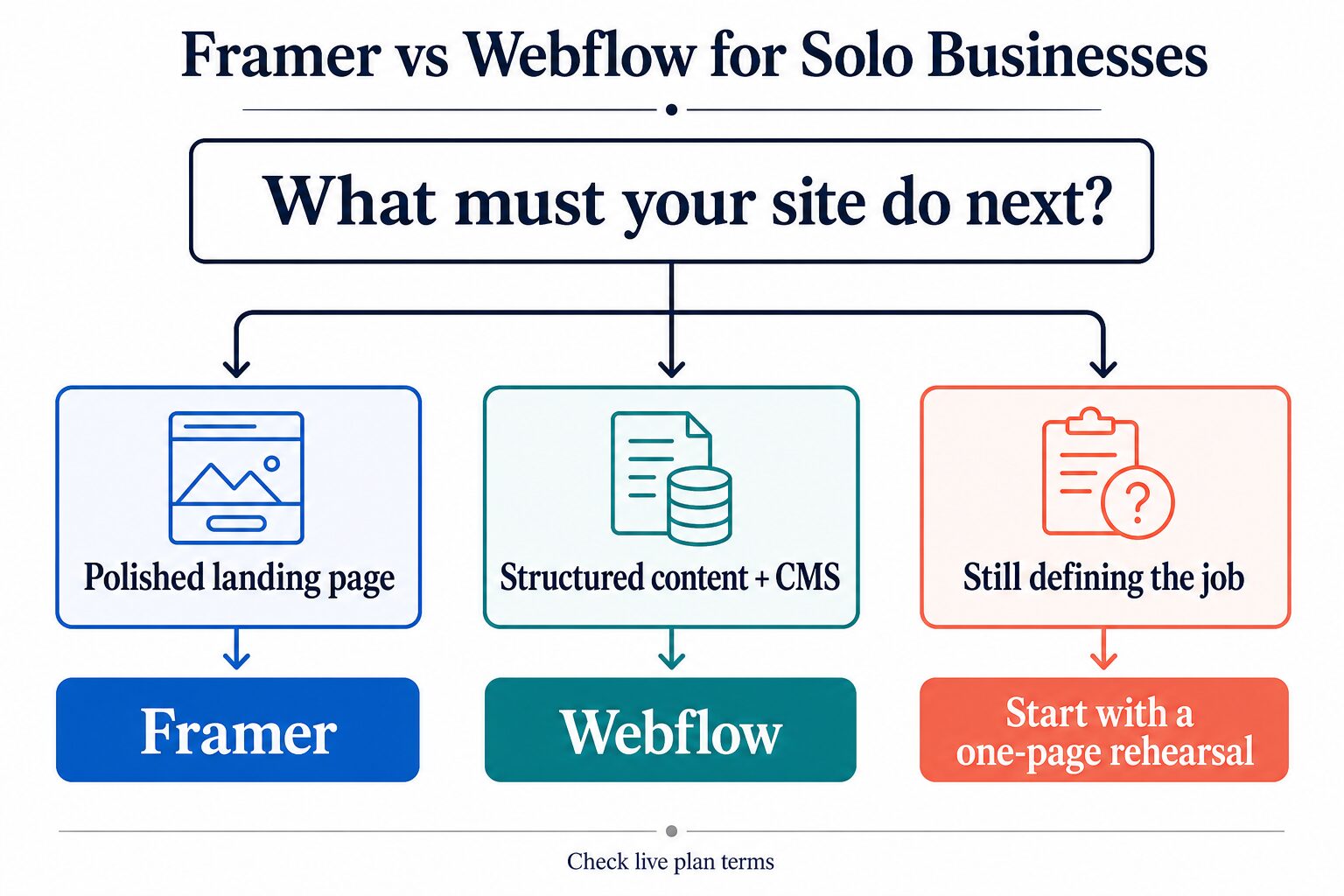
Use this decision tree before you compare every feature
The practical first filter is simple. If the immediate job is a polished marketing page, begin with Framer’s official plan and documentation. If the immediate job is a site with structured content that you expect to manage repeatedly, begin with Webflow’s current Site and Workspace information. If the job is still vague, neither comparison page can substitute for defining it.
Run a one-page rehearsal before you upgrade
A short rehearsal will not prove which builder is universally better. It gives you evidence about the small piece of work you are responsible for next.
- Name one visitor action. Choose one: request a quote, book a call, view a portfolio, join a list, read a key article, or buy one item.
- Draft one complete page. Add an accurate headline, a short explanation, one action, and a real contact route. Do not decide from a blank template alone.
- Model one repeatable update. If you expect articles, case studies, product entries, or testimonials, sketch the fields and one editing task. This reveals whether a CMS workflow is actually next.
- Inspect the checkout terms. Confirm the current billed term, taxes, custom-domain requirement, included roles, plan limits, and any add-on needed in the first month. Webflow announced plan simplification in 2026, so avoid relying on an old comparison table.
- Trace the data path. Before a form or booking widget goes live, decide what information is collected, who can access it, what consent language is needed, and which connected tools receive it.
When Framer is the better first path
Framer is a sensible first evaluation when the business needs a visually led site quickly and the work is mostly about a small number of carefully designed pages. Its official pricing page shows a Free plan for exploration and says that connecting a custom domain requires a paid plan. It also lists Basic and Pro plan tiers, along with CMS, page, bandwidth, and editor information that you should compare with the site you actually plan to run.
Best for: a solo operator who can name a landing page, portfolio, campaign page, or compact marketing site as the next job and wants to assess a visual-canvas workflow.
Skip it for now if: the main unknown is not the design but the structure of a growing library of content, many recurring content types, or a workflow you have not mapped yet. In that case, run the rehearsal before treating a plan tier as the answer.
On Framer’s pricing page checked July 13, 2026, Basic showed $10 per month and Pro showed $30 per month. The page also says billing-cycle selection and applicable taxes affect checkout. Treat those as a dated starting point, not a promise: confirm the live plan, currency, limits, and any add-on before purchase.
When Webflow is the better first path
Webflow is worth evaluating first when the site is already a content operation rather than only a launch page. Its pricing guidance explains that every site lives in a Workspace and that Site plans cover publishing, hosting, and related site-building features. That model can be a better fit when the site needs an intentional content structure and an operating process for future updates.
Best for: a solo business that has defined recurring content, expects to manage CMS entries, or needs to evaluate the difference between a collaborative/staging area and the plan for the live site.
Skip it for now if: you only need one polished page and the added structure would postpone the actual launch. Start with the page brief, then revisit Webflow when the content model is real.
Webflow’s own materials say a new account starts with a free Workspace and Starter Site plan, while paid Site plans are used when you need to publish, host, or unlock additional site features. Its plan lineup was updated in May 2026, so use the live pricing page and plan-change guidance for your exact current options instead of trusting a price from an older review.
Make the next six updates visible before you commit
A solo business rarely stays on a single homepage. The more useful question is whether you can picture the next six pieces of maintenance without creating a private backlog of one-off fixes. Write those updates down before you choose a plan:
- Replace the service description after a real client conversation.
- Add a portfolio item or case study with the same fields as the first one.
- Publish a short article or resource page that supports a customer question.
- Change a seasonal offer, booking link, or lead-form message.
- Give a collaborator only the access they need to update approved content.
- Preserve a redirect or page title when an older URL must change.
If those updates mostly mean revising a handful of designed pages, a Framer-style visual workflow may remain the cleaner starting point. If they reveal repeated content types, fields, draft/publish responsibilities, and a growing library, spend more time evaluating Webflow’s Workspace and Site-plan model. This is not a claim that one platform will prevent future migration. It is a way to expose the maintenance model before a first launch becomes a larger rebuild.
Keep the decision narrow. You do not need to predict a five-year roadmap. You need enough clarity to avoid choosing a platform because it looked impressive in a comparison table while the first recurring update remains undefined.
Privacy, form data, and AI-input checks
Platform security information is useful, but it does not finish the privacy work for a solo business. Framer’s terms say customers are responsible for determining whether the service meets their own requirements and legal obligations. Webflow’s privacy FAQs explain that it provides a DPA and describes its security measures, while also noting that privacy-law questions can require local legal guidance.
A safer launch rule
Do not put private client records, health, legal, financial, student, or workplace information into prompts, drafts, or form fields unless your agreement and organization allow it. Before publishing a lead form, review the current terms, your privacy notice, consent, access permissions, and every connected analytics, email, booking, or payment service.
Where to go next
For a wider shortlist, read our best AI website builders for solo businesses. When you have chosen a platform, use the AI website builder checklist before you publish. If ownership and control matter more than design speed, compare WordPress versus AI website builders for small teams.
Final recommendation
Choose Framer as the first path when the next deliverable is a small, polished marketing site and visual iteration is the job. Choose Webflow as the first path when structured content and a deeper site workflow are already planned. If neither sentence fits, do the one-page rehearsal first. The right platform is the one that lets you publish an accurate first page and maintain the next real update without paying for a future you have not defined.
Frequently asked questions
Is Framer free for a business website?
Framer lists a Free plan, but its current FAQ says a custom domain requires a paid plan. Check its live pricing page for the plan limits and terms that apply to your launch.
Does Webflow have a free starting point?
Webflow says new accounts receive a free Workspace and Starter Site plan. Review its live pricing page before assuming the free option includes the publishing, hosting, or feature access you need.
Which is cheaper, Framer or Webflow?
A displayed monthly price is not enough to answer safely. Compare the current required plan, billing cycle, tax, domain, roles, limits, and the work you will actually perform in the first month.
Can a solo business collect leads without a privacy review?
No. A platform can provide security and privacy materials, but you still need an accurate notice, a consent path where applicable, and review of the services that receive visitor data.